
Thegoodocs.com
Tracker Templates
Expense Tracker Templates
Budget Planner & Finance Tracker Template
Log in
Sign up
ADVERTISEMENT
ADVERTISEMENT
Budget Planner & Finance Tracker Template
Use this free template with Google Sheets and Microsoft Excel
ADVERTISEMENT
Save
Template Specification
Format
Google Sheets, Microsoft Excel
Created
May 30, 2024
Last Updated
September 12, 2026
Community
Added to collections by 45 Users
Usage Stats
14 downloads this month
About this template
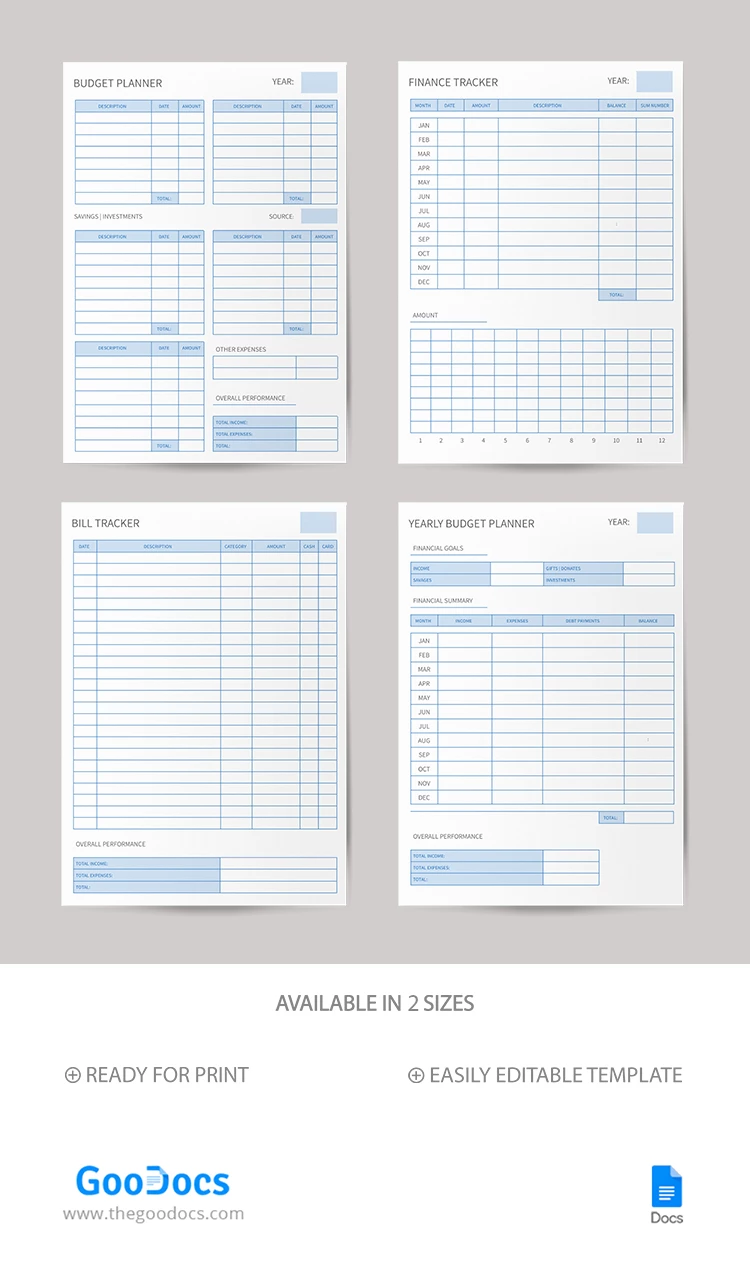
This all-in-one Budget Planner template is indispensable to effectively use your income. Get four tools at once, including a budget planner, finance tracker, bill tracker, and yearly financial plan template!
Essential Tool to Allocate Finances
This form is ideal for people who want to keep track of personal, couple, and even family budgets. The professional, no-frills blue design makes this tool extremely versatile.
Four Different Forms for Any Task
By receiving a copy of this printable planner template in Google Docs, you can get several tools at once:
- Budget Planner: the page includes expenses, savings, and investments sections.
- Finance Tracker: Easily track your annual payments by recording up to nine major expense items for each month.
- Bill Tracker: fill in up to 30+ expenses with descriptions, categories, and amounts. Write down overall performance, including totals for income and expenses.
- Yearly Budget Planner: make your financial goals clear. Fill in your desired income and expenses and summarize for each month.
By the way, you can find the best schedule template in Google Sheets and Excel! Find more unique financial planner templates from TheGoodocs.
ADVERTISEMENT
Free Template
Download Free Template
Choose your platform and start editing right away
PLATFORM
Google Sheets
Opens in browserMicrosoft Excel
.xlsx
PAPER SIZE
A4
US Letter
Google Sheets – A4
No account required • Attribution required
Add to Collection
Facebook
Pinterest
Twitter
Copy link
WHAT’S INCLUDED
Four separate planner and tracker pages
Sections for income, savings, investments
Monthly breakdown for expense tracking
Overall performance summary section
Tracker Tips
1
Regularly update entries to stay accurate.
2
Set financial goals in the Yearly Planner.
3
Review savings monthly to track progress.
4
Customize categories for better organization.
FAQ
Is this template compatible with Excel?
Yes, you can use it with both Excel and Google Sheets.
Can I customize the categories?
Yes, all categories are fully customizable to fit your needs.
Is this template easy to use?
Absolutely, it is designed for user-friendly interaction.
Is the template free of charge?
Yes, it is available for free download.
Can I use it for family budgeting?
Yes, it's versatile for personal, couple, or family budgets.
ADVERTISEMENT
How to Use and Edit This Template

1
Get Your Document
Click the "Edit Template" button to create your own editable copy in Google Sheets or download for Microsoft Excel

2
Customize Everything
Easily change colors, fonts, and layouts to match your unique style or brand identity

3
Add Your Content
Fill in your data, upload images, and replace the placeholder text with your own information

4
Print, Export, or Share
Print, export as PDF, or share instantly
Related Templates
Recently Viewed
Budget Planner & Finance Tracker
Open in Google Sheets and Microsoft Excel
Budget Planner & Finance Tracker
Open in Microsoft Excel
Your session has ended!
This may be due to prolonged inactivity or your account being used on another device.
OK
Link copied to clipboard