
Log in
Sign up
ADVERTISEMENT
ADVERTISEMENT
Light Inventory Management Template
Use this free template with Google Sheets and Microsoft Excel
4.53 (2 reviews)
•
Last updated
Updated
September 26, 2026
•
Created by
Alexander Wright
ADVERTISEMENT
Save
Template Specification
Format
Google Sheets
Created
January 13, 2022
Last Updated
September 26, 2026
Community
Added to collections by 5 Users
Usage Stats
0 downloads this month
About this template
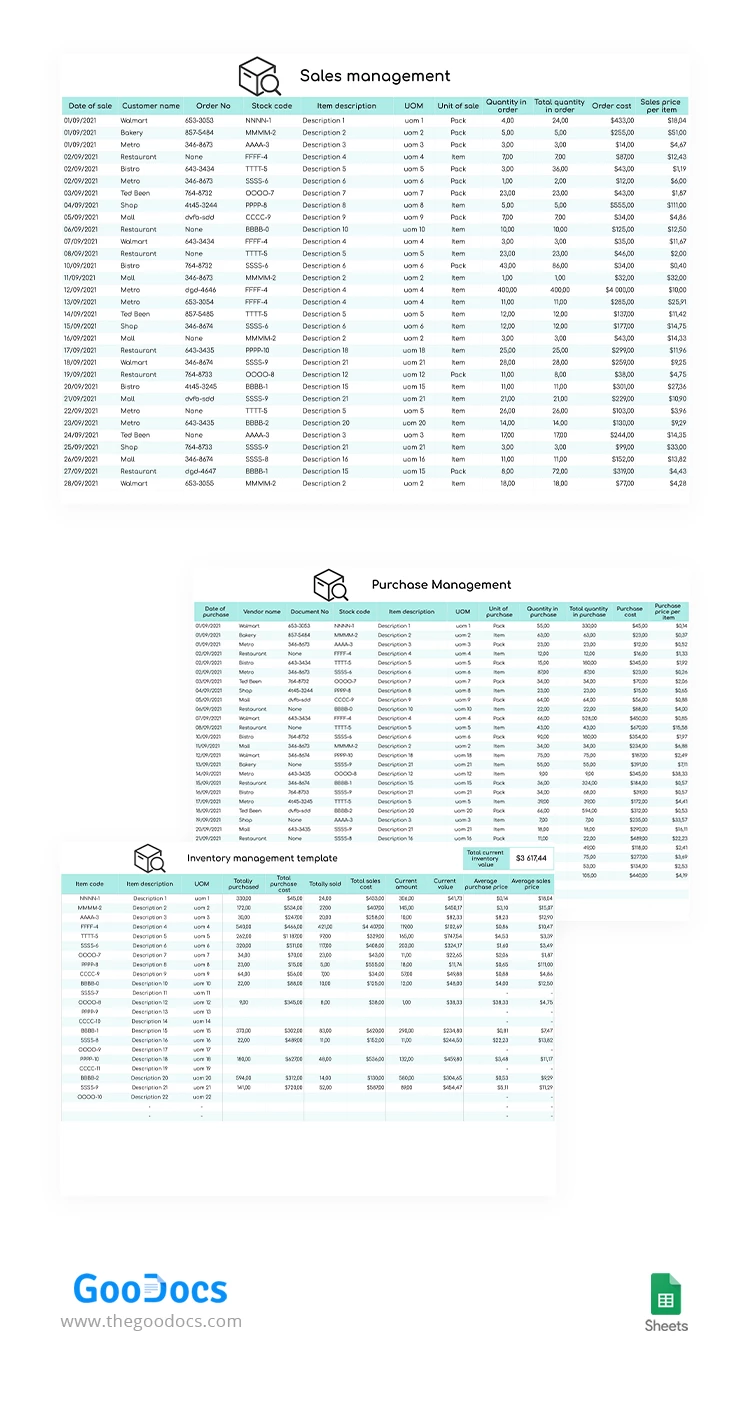
Inventory management is much easier if you use a properly designed paper for that. Our designers created this small business inventory sheet to make the work more pleasant and less complicated for you. From now on, you will always know how many different items you have in your store. The inventory management is not as scary as it seems if you have the right tool for doing it.
ADVERTISEMENT
Free Template
Download Free Template
Choose your platform and start editing right away
PLATFORM
Google Sheets
Opens in browser
PAPER SIZE
US Letter
Google Sheets – US Letter
No account required • Attribution required
Add to Collection
Facebook
Pinterest
Twitter
Copy link
WHAT’S INCLUDED
Three management sections: sales, purchase, inventory
Automatic calculations for total costs
Ease of tracking with item codes
Structure for UOM and stock codes
Inventory Tips
1
Regularly update the inventory to ensure accurate stock levels.
2
Use clear item descriptions for efficient tracking.
3
Monitor purchase and sales trends monthly.
4
Customize units of measure to fit your business.
FAQ
Is this template compatible with Google Sheets and Excel?
Yes, it works with both Google Sheets and Excel.
How easy is the template to use?
It's designed to be user-friendly with straightforward layouts.
Can I customize the template for my needs?
Yes, you can easily modify all parts of the template.
Is this inventory management template free?
Absolutely, it's available for free download.
Does it automatically update totals?
Yes, totals and costs update automatically with your inputs.
ADVERTISEMENT
How to Use and Edit This Template

1
Get Your Document
Click the "Edit Template" button to create your own editable copy in Google Sheets or download for Microsoft Excel

2
Customize Everything
Easily change colors, fonts, and layouts to match your unique style or brand identity

3
Add Your Content
Fill in your data, upload images, and replace the placeholder text with your own information

4
Print, Export, or Share
Print, export as PDF, or share instantly
Related Templates
Recently Viewed
Light Inventory Management
Open in Google Sheets and Microsoft Excel
Light Inventory Management
Open in Microsoft Excel
Your session has ended!
This may be due to prolonged inactivity or your account being used on another device.
OK
Link copied to clipboard