
Log in
Sign up
ADVERTISEMENT
ADVERTISEMENT
Food Storage Inventory Template
Use this free template with Google Sheets and Microsoft Excel
4.25 (1 reviews)
•
Last updated
Updated
October 8, 2026
•
Created by
Natalia Prokhorenko
•
Type
Spreadsheet
ADVERTISEMENT
Save
Template Specification
Format
Google Sheets, Microsoft Excel
Created
July 9, 2025
Last Updated
October 8, 2026
Community
Added to collections by 7 Users
Usage Stats
6 downloads this month
Key Features of This Template
Structure
Spreadsheet Inventory Templates
Style
Minimalist
About this template
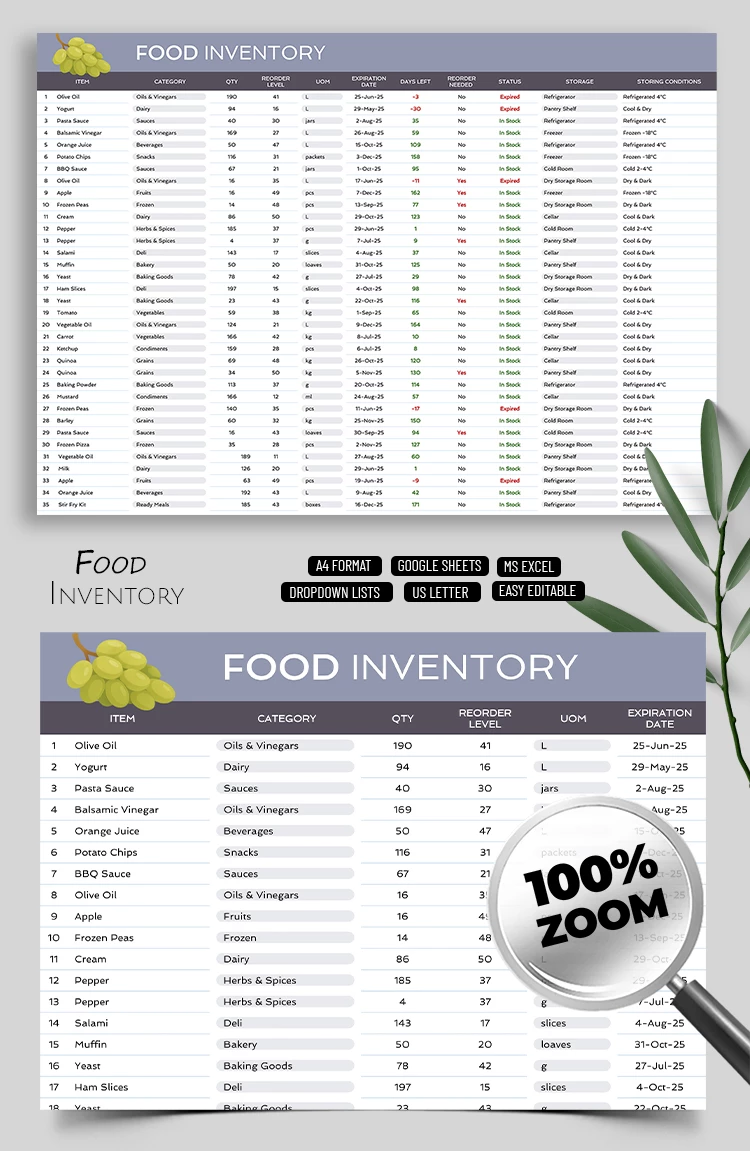
Need an accurate food inventory for your business? Use our Food Inventory Template Tracker Spreadsheet. This template is designed for both business and personal use to help you keep your kitchen organized and save time.
Well-Organized Food Stock Tracker
With our inventory template, you can easily:
- Add a list of all essential products in your kitchen.
- Enter the quantity of each product and its reorder level in separate columns.
- Add an expiration date and automatically receive an indicator showing how many days remain and whether a reorder is needed.
- Include storage conditions for each item.
These are just the main features of our free food inventory template, and it is also effortless to use. Make a copy in Google Sheets or download it in Excel, then fill out the Lists and Sheets section. Most key metrics for each product will be calculated automatically based on your entries.
Work comfortably on any device and collaborate with your team using the inventory spreadsheet from TheGoodocs.
ADVERTISEMENT
Free Template
Download Free Template
Choose your platform and start editing right away
PLATFORM
Google Sheets
Opens in browserMicrosoft Excel
.xlsx
PAPER SIZE
A4 Landscape
US Letter Landscape
Google Sheets – A4 Landscape
No account required • Attribution required
Add to Collection
Facebook
Pinterest
Twitter
Copy link
WHAT’S INCLUDED
Automatic expiration date tracking
Reorder level alerts system
Detailed storage conditions section
Visual status indicators for stock
Inventory Tips
1
Update the inventory quantities weekly for accuracy.
2
Use the reorder alerts to prevent stockouts.
3
Check expiration dates monthly to avoid waste.
4
Group items by category for faster data entry.
FAQ
Is this template compatible with Google Sheets?
Yes, it works seamlessly with Google Sheets.
Can I use this in Excel?
Yes, it is fully compatible with Microsoft Excel.
Is the template easy to customize?
Absolutely, you can easily adjust categories and items.
Is this template free?
Yes, you can download and use it for free.
How does the expiration tracking work?
The template shows days left and alerts for expired items.
ADVERTISEMENT
How to Use and Edit This Template

1
Get Your Document
Click the "Edit Template" button to create your own editable copy in Google Sheets or download for Microsoft Excel

2
Customize Everything
Easily change colors, fonts, and layouts to match your unique style or brand identity

3
Add Your Content
Fill in your data, upload images, and replace the placeholder text with your own information

4
Print, Export, or Share
Print, export as PDF, or share instantly
Related Templates
Recently Viewed
Food Storage Inventory Template
Open in Google Sheets and Microsoft Excel
Food Storage Inventory Template
Open in Microsoft Excel
Your session has ended!
This may be due to prolonged inactivity or your account being used on another device.
OK
Link copied to clipboard