
Thegoodocs.com
Tracker Templates
Attendance Tracker Templates
Employee 10-Day Attendance Tracker Template
Log in
Sign up
ADVERTISEMENT
ADVERTISEMENT
Employee 10-Day Attendance Tracker Template
Use this free template with Google Sheets and Microsoft Excel
4.42 (2 reviews)
•
Last updated
Updated
September 12, 2026
•
Created by
Ella Taylor
ADVERTISEMENT
Save
Template Specification
Format
Google Sheets
Created
November 5, 2021
Last Updated
September 12, 2026
Community
Added to collections by 0 Users
Usage Stats
2 downloads this month
About this template
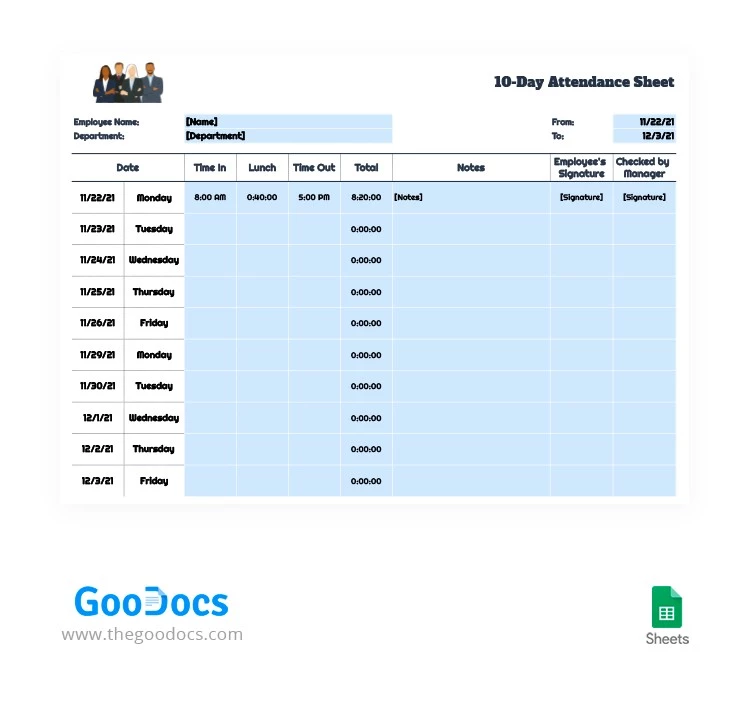
Is tracking your employees' attendance important for you? With our sheet template you will always be able to see who in your company works the best. Just write the dates of the working days in the office, add the names of your workers and start filling in these little squares on a regular basis. Using our attendance sheets is extremely convenient - just try them!
ADVERTISEMENT
Free Template
Download Free Template
Choose your platform and start editing right away
PLATFORM
Google Sheets
Opens in browser
PAPER SIZE
US Letter
Google Sheets – US Letter
No account required • Attribution required
Add to Collection
Facebook
Pinterest
Twitter
Copy link
WHAT’S INCLUDED
10-day attendance tracking template
Customizable employee name and department fields
Automatic total work hours calculation
Sections for notes and signatures
Tracker Tips
1
Regularly update times to maintain accurate records.
2
Add detailed notes for unusual absences.
3
Ensure signatures for verification purposes.
4
Customize department fields for specific teams.
FAQ
Is this compatible with Excel and Google Sheets?
Yes, it's compatible with both platforms.
Is the template easy to use?
Absolutely, it's designed for user-friendly operation.
Can I customize the template?
Yes, you can adjust fields to suit your needs.
Is this attendance sheet free?
Yes, it's available for free download.
How do I record lunch breaks?
There's a dedicated column for lunch time entries.
ADVERTISEMENT
How to Use and Edit This Template

1
Get Your Document
Click the "Edit Template" button to create your own editable copy in Google Sheets or download for Microsoft Excel

2
Customize Everything
Easily change colors, fonts, and layouts to match your unique style or brand identity

3
Add Your Content
Fill in your data, upload images, and replace the placeholder text with your own information

4
Print, Export, or Share
Print, export as PDF, or share instantly
Related Templates
Recently Viewed
Employee 10-Day Attendance Tracker Template
Open in Google Sheets and Microsoft Excel
Employee 10-Day Attendance Tracker Template
Open in Microsoft Excel
Your session has ended!
This may be due to prolonged inactivity or your account being used on another device.
OK
Link copied to clipboard