
Concise With Summary ATS Resume Template
Use this free template with Google Docs and Microsoft Word
Template Specification
Key Features of This Template
About this template
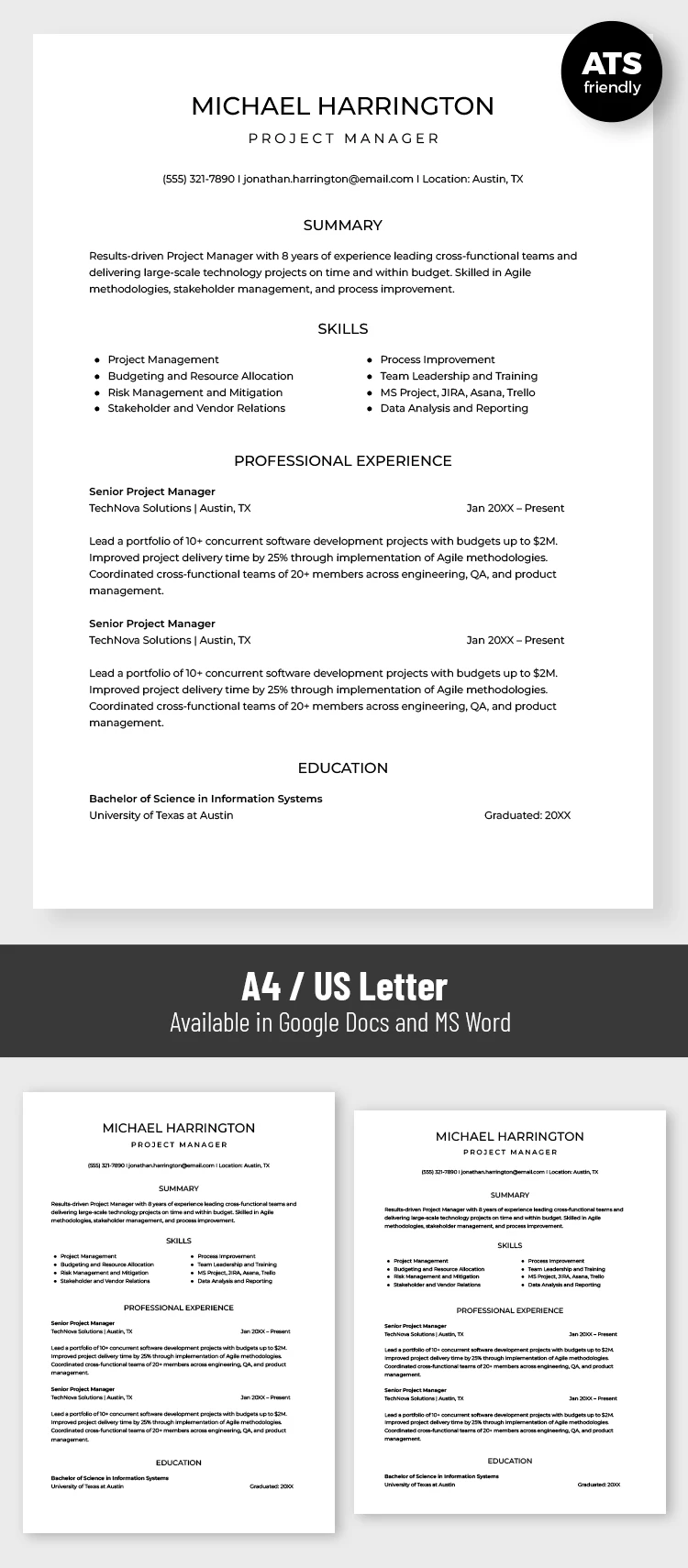
Get free access to our Concise ATS Resume With Summary right away. This template features clean, simplified formatting and is fully compatible with modern applicant tracking systems. Instead of a complex or graphic-heavy design, it offers a clean layout with a clear structure, bulleted lists, and distinct sections.
Pass The ATS Scan With This Resume
Most companies use candidate screening systems before your resume even reaches the hiring manager. Passing this screening stage is essential, and this template for a resume is designed specifically for this purpose. To achieve this, the layout uses plain text, clear headings for each section, bullet points in the skills section, and a minimalist black-and-white design.
You can start filling out our combination resume now:
- Add your name, desired position, and contact information.
- Detail your skills using eight bullet points and add your education.
- List your last two jobs, including employment period, company names, responsibilities, and achievements.
This editable template can be easily saved as a PDF and printed or shared online. You can choose between A4 and US Letter formats before downloading. Browse our collection of free ATS-friendly resume templates via the link.
Download Free Template
Google Docs
Opens in browserMicrosoft Word
.docsWHAT’S INCLUDED
Resume Tips
FAQ
How to Use and Edit This Template

Get Your Document

Customize Everything

Add Your Content

Print, Export, or Share
Related Templates
Recently Viewed
