ATS-Optimized Project Manager Resume Template
Use this free template with Google Docs and Microsoft Word
Template Specification
Key Features of This Template
About this template
Take advantage of our ATS-Optimized Project Manager Resume Template to ensure your document passes automated screening. Our template for a resume is designed to make sure your qualifications, work experience, and skills are easily recognized by these systems, helping your resume reach the recruiter's desk. You can also save it as a PDF for easy sending.
Create Your Scan-Ready PM Resume in Minutes
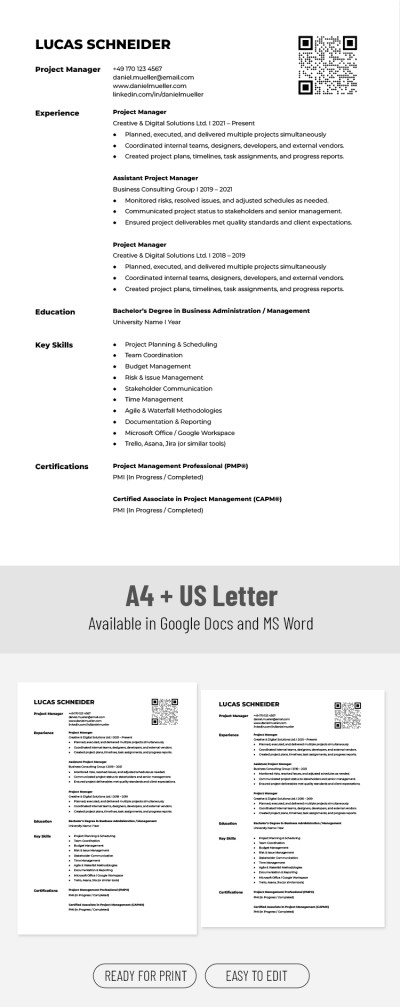
Our template is structured into five separate, vertically organized sections. On this single page, you can fully showcase your work history and even include a QR code for your portfolio or website.
Start filling out our project manager resume template today:
- Add your name and contact information in the header section.
- Provide a detailed overview of your three most recent positions in reverse-chronological order in the experience section.
- Add your education details, key soft and hard skills, and certifications in the remaining sections of the template.
You can fill out the template in Google Docs or Word, then share it with recruiters immediately, or save it as a .docx or PDF file. You can even print it in US Letter or A4 size with no extra setup. Choose your next simple resume template on our website.
Download Free Template
Google Docs
Opens in browserMicrosoft Word
.docsWHAT’S INCLUDED
Resume Tips
FAQ
How to Use and Edit This Template

Get Your Document

Customize Everything

Add Your Content

Print, Export, or Share
Related Templates
Recently Viewed