Get unlimited access to 5000+ Templates for Google Docs, Slides and Sheets
Unlimited Access
All Templates
ADVERTISEMENT
ADVERTISEMENT

Funeral Program – Elegant & Editable Design

Use this free template with Google Docs and Microsoft Word
4.25 (1 reviews)
Last updated Updated July 11, 2026
Created by Halyna Uygur
ADVERTISEMENT

Template Specification

Format Google Docs, Microsoft Word
Created March 21, 2025
Last Updated July 11, 2026
Community Added to collections by 3 Users
Usage Stats 3 downloads this month

Key Features of This Template

Suitable For Funeral , Funeral Home
Style Elegant

About this template

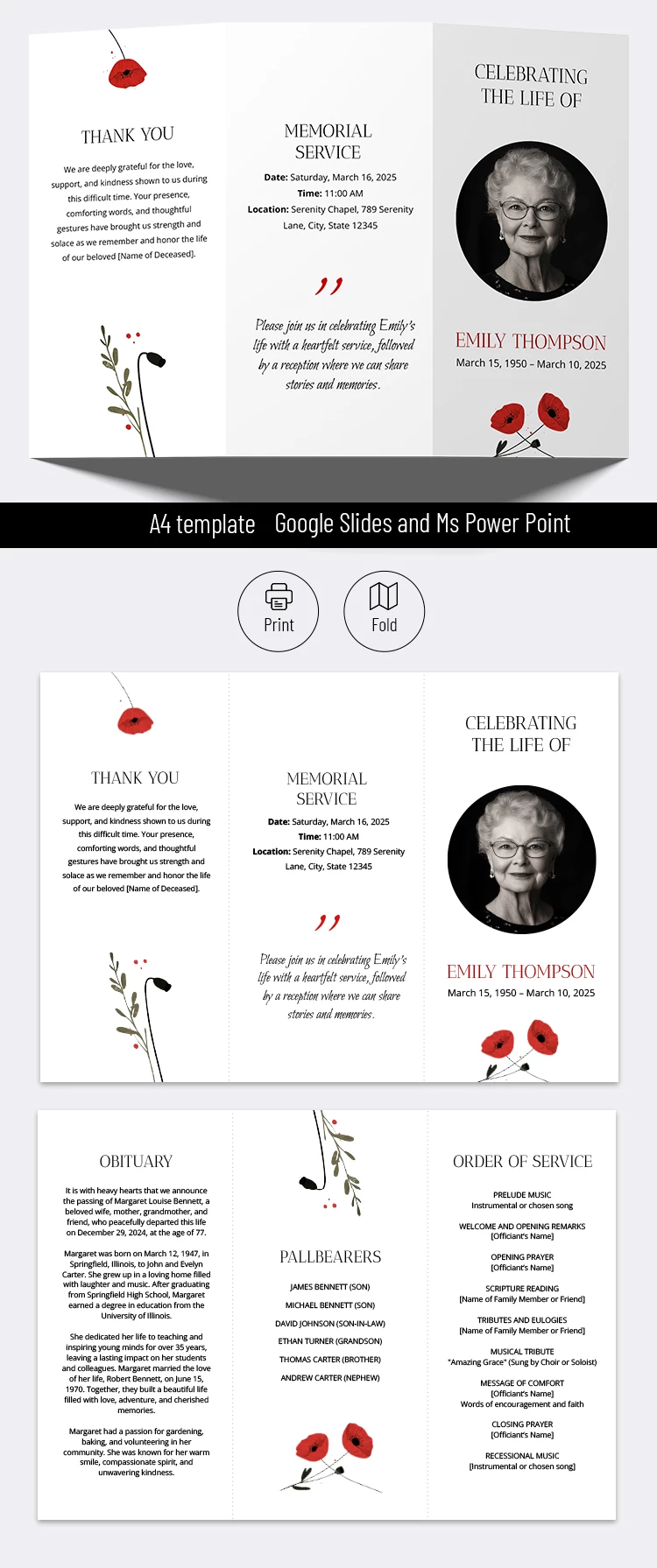
Our free Funeral Program Template features an elegant, editable design that is perfect for funeral homes and families wishing to honor their loved one. You can easily add text, photos, and other details without needing any special design skills or experience.

Elegant and Clean Design

This free funeral program template features a clean white background, a round photo placeholder, and thoughtful design elements including red poppies and subtle highlights for the main sections.

The trifold layout provides a professional structure right out of the box. We have also included sample text, so all you need to do is replace it with your own words and the details of the service.

All Essential Sections Included

The layout includes a cover page where you can add a photo, name, and dates. The inside pages feature traditional sections for an Obituary, Order of Service, Pallbearers, and a Thank You note. You can also find more program templates for any occasion on our website.

ADVERTISEMENT
Free Template

Download Free Template

Choose your platform and start editing right away
PLATFORM

Google Docs

Opens in browser

Microsoft Word

.docs
PAPER SIZE
A4 Landscape
Google Docs – A4 Landscape
No account required • Attribution required

WHAT’S INCLUDED

Customizable trifold brochure design
Sections: obituary, service, thank you
Editable text and photo placeholders
Beautiful red poppy decorations

Program Tips

1
Personalize each section to reflect the deceased's life.
2
Choose high-quality images for better print results.
3
Proofread all text for accuracy before printing.
4
Print on quality paper for a professional look.

FAQ

Is the template free to use? Yes, it’s free to download and customize.
Can I use it in PowerPoint? Yes, it's compatible with both PowerPoint and Google Slides.
How easy is it to customize? It's user-friendly and requires no design skills.
What sections are included? Sections include Memorial Service, Obituary, and Thank You.
Do I need a Google account? No, you can download the PowerPoint version without an account.
ADVERTISEMENT

How to Use and Edit This Template

Get Your Document

1

Get Your Document

Click the "Edit Template" button to create your own editable copy in Google Docs or download for Microsoft Word
Customize Everything
2

Customize Everything

Easily change colors, fonts, and layouts to match your unique style or brand identity
Add Your Content
3

Add Your Content

Fill in your data, upload images, and replace the placeholder text with your own information
Print, Export, or Share
4

Print, Export, or Share

Print, export as PDF, or share instantly

Related Templates

Recently Viewed