
Perfect Travel Itinerary Template
Use this free template with Google Sheets and Microsoft Excel
4.25 (1 reviews)
•
Last updated
Updated
October 24, 2026
•
Created by
Natalia Prokhorenko
•
Type
4 Days, Professional
ADVERTISEMENT
Log in
Sign up
ADVERTISEMENT
Save
Template Specification
Format
Google Sheets, Microsoft Excel
Created
January 9, 2025
Last Updated
October 24, 2026
Community
Added to collections by 33 Users
Usage Stats
15 downloads this month
Key Features of This Template
Duration
4 Day Itinerary Templates
Suitable For
Travel Tours , Travel Trips
About this template
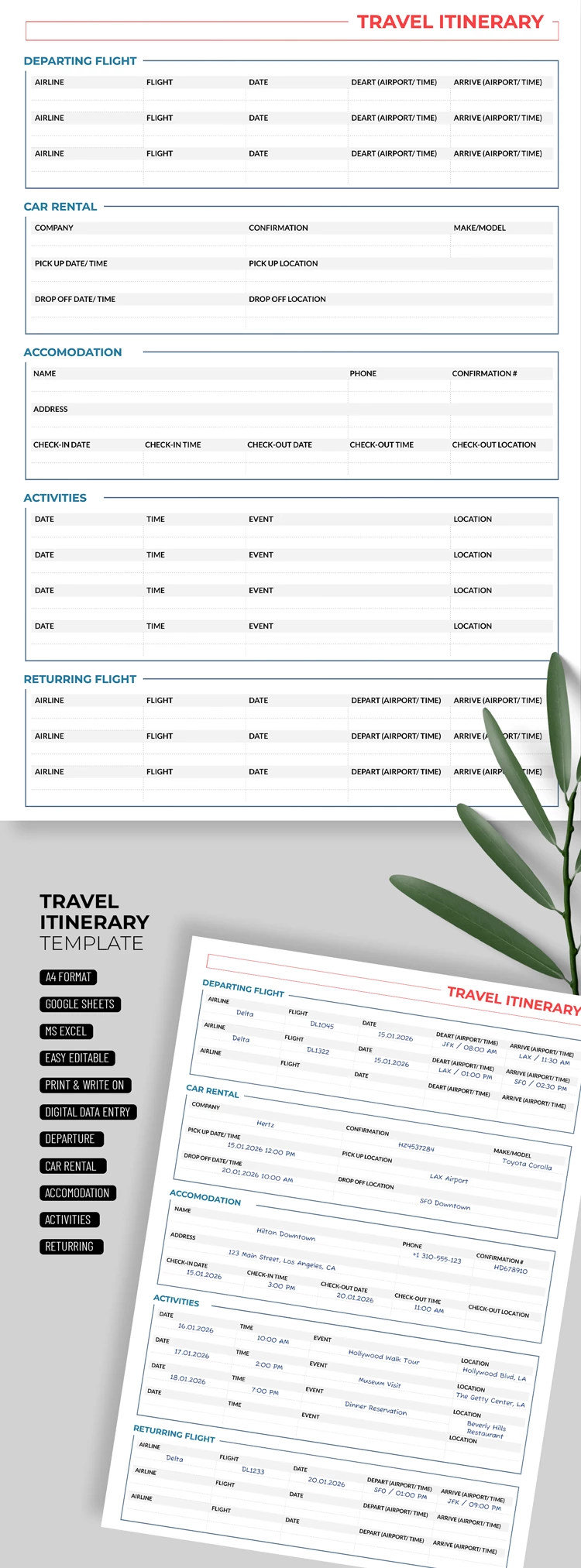
Make sure your trip is perfectly planned with our Travel Itinerary Template! This travel itinerary template in Excel with a free download is also available in Google Sheets. The spreadsheet is 100% editable, and you can also print it out.
Universal Spreadsheet for Your Itinerary
This itinerary planning template includes the universal fields you need for any trip and a grey-colored design.
Inside the template, you will find five main blocks:
- The departing flight section includes airline, flight, date, departure, and arrival time fields.
- The car rental section features company, confirmation, model, pick-up date, time, and location, and placeholders for other essential details.
- Include the owner's name and contact details, address, confirmation number, check-in and check-out times via the Accommodation section.
- The activities section includes date, time, event, and location placeholders for your planned activities.
- The returning flight section also contains cells to type in crucial details about your flight.
You can change placeholders and titles, and choose new fonts or brighter colors for the design in just a couple of clicks. Use this option for free, or choose a free itinerary template in Word on our website.
ADVERTISEMENT
Free Template
Download Free Template
Choose your platform and start editing right away
Edit in Google Sheets
Download in Microsoft Excel
No account required • Attribution required
Add to Collection
Facebook
Pinterest
Twitter
Copy link
Customize text, images, and colors
Print-ready for home or office
ADVERTISEMENT
How to Use and Edit This Template

1
Get Your Document
Click the "Edit Template" button to create your own editable copy in Google Sheets or download for Microsoft Excel

2
Customize Everything
Easily change colors, fonts, and layouts to match your unique style or brand identity

3
Add Your Content
Fill in your data, upload images, and replace the placeholder text with your own information

4
Print, Export, or Share
Print, export as PDF, or share instantly
Related Templates
Recently Viewed
Perfect Travel Itinerary
Open in Google Sheets and Microsoft Excel
Perfect Travel Itinerary
Open in Microsoft Excel
Your session has ended!
This may be due to prolonged inactivity or your account being used on another device.
OK
Link copied to clipboard