Restaurant Kitchen Inventory Template
Use this free template with Google Sheets and Microsoft Excel
Template Specification
Key Features of This Template
About this template
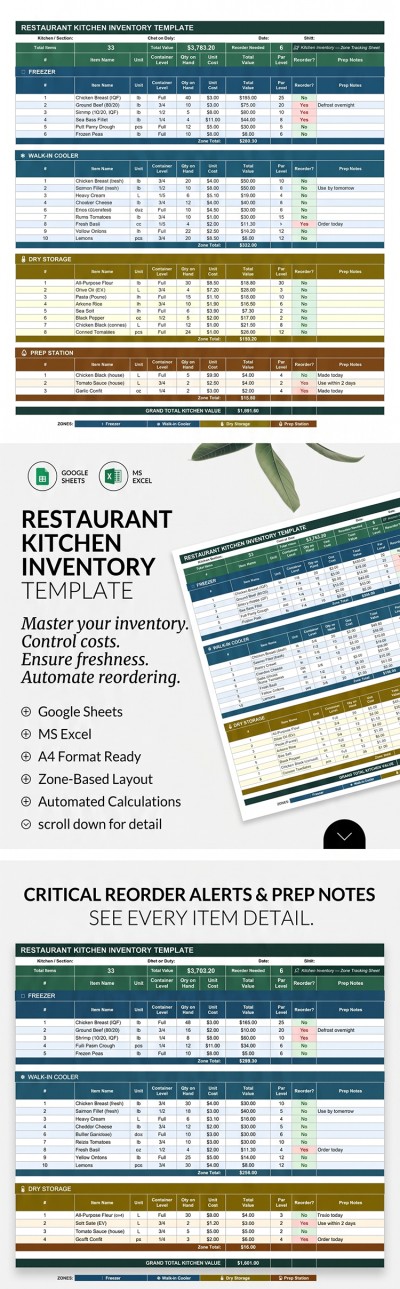
Our Restaurant Kitchen Inventory Template is your go-to choice for creating a structured and easy-to-use inventory tracker. This inventory template for Google Sheets and Excel features a pre-made design and is available for free exclusively on our website. The layout is conveniently divided into categories, while built-in formulas help you manage your stock much faster.
Track Your Kitchen Food Stock With Ease
Our template features a separate header section that automatically calculates the total cost of all items and the number of products requiring a reorder. Here, you can also enter the kitchen section, restaurant name, chef on duty, date, and shift.
The main part of our restaurant kitchen inventory template is a convenient table:
- You can record all food stock across different categories depending on its location in the kitchen.
- For each product, you can specify the item name, unit, container level, quantity on hand, unit cost, and par level.
- The template will automatically calculate the total value of each product and display its reorder status based on the data you enter.
Start using this option or choose another free inventory spreadsheet template on our website. You can collaborate with your staff on any device within a single document or print out your inventory reports.
Download Free Template
Google Sheets
Opens in browserMicrosoft Excel
.xlsxWHAT’S INCLUDED
Inventory Tips
FAQ
How to Use and Edit This Template

Get Your Document

Customize Everything

Add Your Content

Print, Export, or Share
Related Templates
Recently Viewed