Get unlimited access to 5000+ Templates for Google Docs, Slides and Sheets
Unlimited Access
All Templates
ADVERTISEMENT
ADVERTISEMENT

Open House Flyer

Use this free template with Google Docs and Microsoft Word
4.25 (1 reviews)
Last updated Updated August 4, 2026
ADVERTISEMENT

Template Specification

Format Google Docs
Created August 23, 2024
Last Updated August 4, 2026
Community Added to collections by 10 Users
Usage Stats 5 downloads this month

About this template

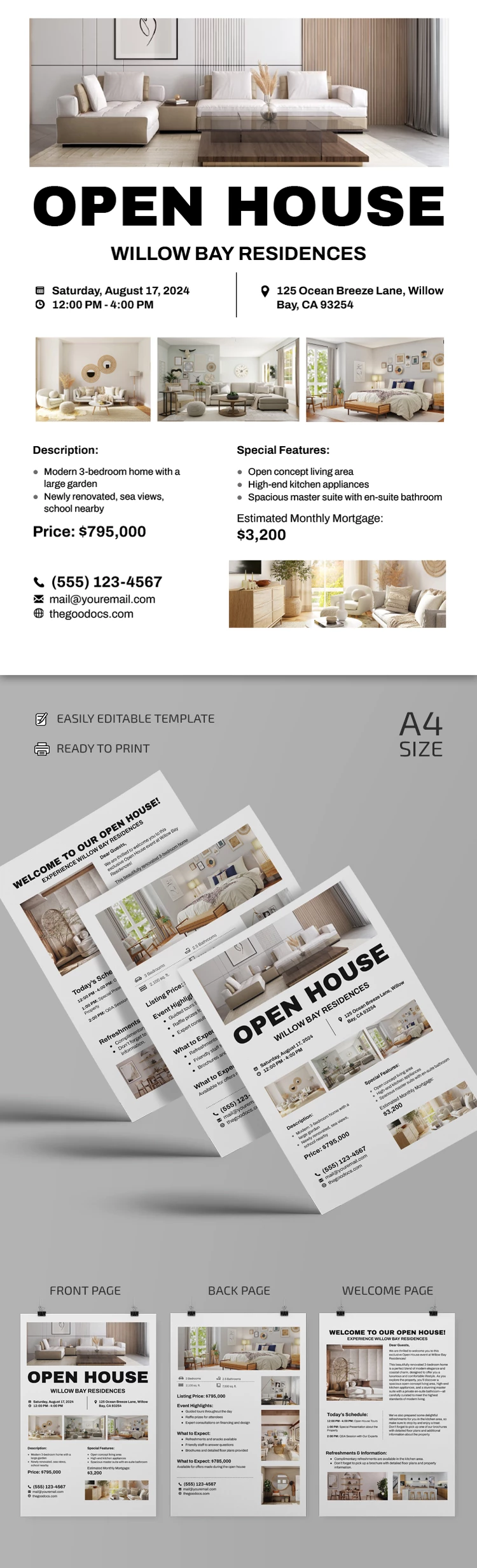
Take a closer look at our Open House Flyer in Google Docs and Word formats (we also offer a flyer template in Google Slides)! You can utilize our three-page blank to advertise or provide potential buyers with essential information about your real estate.

Modern and Practical Design

Our example offers a ready-to-use layout with easy-to-read fonts. You can emphasize (in fonts and lists) the most vital information about the property, and plenty of placeholders for interior and exterior photography are included.

This template consists of three pages, so you can make a double-sided flyer by choosing two layout options from three, or just use them all.

Professional Structure for Open House Event

The first thing potential customers will see is the address in bold and several photos of the house. Then, you can indicate the price (for rent or purchase), contact information, highlights, schedule, etc. Want more flyer options for your needs? TheGoodocs offers hundreds of free printable flyer templates for any market!

ADVERTISEMENT
Free Template

Download Free Template

Choose your platform and start editing right away
PLATFORM

Google Docs

Opens in browser
PAPER SIZE
A4
Google Docs – A4
No account required • Attribution required

WHAT’S INCLUDED

Fully formatted multi-page layout
Editable headings and text styles
Ready-to-fill sections
Print-ready A4 size

Flyer Tips

1
Customize the property details for impact.
2
Add high-quality photos for attraction.
3
Highlight key selling points effectively.
4
Ensure contact information is prominently visible.

FAQ

Is it compatible with Google Docs and Microsoft Word? Yes, it's designed for both platforms.
How easy is it to use? Very easy, with intuitive editing sections.
Can I customize the text styles? Yes, all text styles are editable.
Is this template free? Yes, it's free to download and use.
What page size does it support? The template is in A4 size.
ADVERTISEMENT

How to Use and Edit This Template

Get Your Document

1

Get Your Document

Click the "Edit Template" button to create your own editable copy in Google Docs or download for Microsoft Word
Customize Everything
2

Customize Everything

Easily change colors, fonts, and layouts to match your unique style or brand identity
Add Your Content
3

Add Your Content

Fill in your data, upload images, and replace the placeholder text with your own information
Print, Export, or Share
4

Print, Export, or Share

Print, export as PDF, or share instantly

Related Templates

Recently Viewed