Get unlimited access to 5000+ Templates for Google Docs, Slides and Sheets
Unlimited Access
All Templates
ADVERTISEMENT
ADVERTISEMENT

Family Tree with Siblings Template

Use this free template with Google Slides and Microsoft PowerPoint
4.25 (1 reviews)
Last updated Updated August 4, 2026
Created by Vladimir Belyakin
Type 4 Generations
ADVERTISEMENT

Template Specification

Format Google Slides, Microsoft PowerPoint
Created August 24, 2024
Last Updated August 4, 2026
Community Added to collections by 42 Users
Usage Stats 56 downloads this month

Key Features of This Template

Suitable For Family
Style Simple

About this template

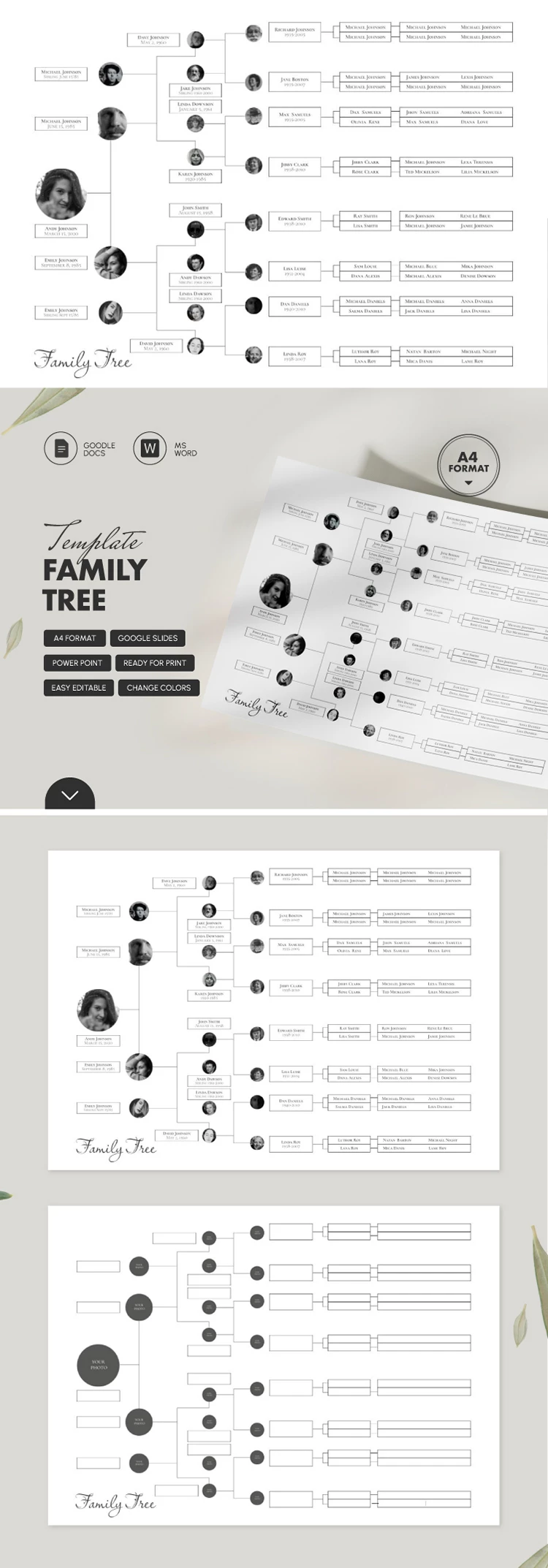
Unlike standard layouts, our Family Tree template offers additional frames so you can add information not only about your parents and grandparents, but also their siblings. This format is perfect for creating a sixth-generation family tree, going all the way back to your great-great-great-grandparents. In fact, the sixth generation alone contains 32 people!

Detailed 6-Level Genealogy Chart with Siblings

We've created a simple yet comprehensive structure for your family tree. This format is suitable not only for a school project but also for building a serious family archive.

Our family tree chart template starts with you, with branches extending to your parents, aunts, and uncles, and then back to your grandparents, great-grandparents, and great-great-great-grandparents.

You can customize the structure and fill out the template in Google Slides and PowerPoint:

  • Add photos and names of all family members.
  • Customize family connections if your parents have more than one sibling.
  • Choose a new background and fonts.
  • Adjust the size of each block.

Once finished, you can share your family tree online or print it on A4 paper. Try this version for free or find a simpler 4-generation family tree template via the link.

ADVERTISEMENT
Free Template

Download Free Template

Choose your platform and start editing right away
PLATFORM

Google Slides

Opens in browser

Microsoft PowerPoint

.pptx
PAPER SIZE
A4
Google Slides – A4
No account required • Attribution required

WHAT’S INCLUDED

Six-generation family tree layout
Editable text and photo placeholders
Ready-to-print A4 format slides
Customizable color themes and fonts

Family Tree Tips

1
Add photos to enhance the family connections.
2
Customize colors to match your family’s style.
3
Include siblings for a detailed tree.
4
Save and print your family tree easily.

FAQ

Is this template compatible with Google Slides? Yes, it works with Google Slides and Microsoft PowerPoint.
Is the template easy to edit? Yes, it's user-friendly and easy to customize.
Can I change the colors and fonts? Absolutely, customize colors and fonts to fit your style.
Is this template free to use? Yes, it's available for free download.
How many slides are included? It includes one comprehensive family tree layout.
ADVERTISEMENT

How to Use and Edit This Template

Get Your Document

1

Get Your Document

Click the "Edit Template" button to create your own editable copy in Google Slides or download for Microsoft PowerPoint
Customize Everything
2

Customize Everything

Easily change colors, fonts, and layouts to match your unique style or brand identity
Add Your Content
3

Add Your Content

Fill in your data, upload images, and replace the placeholder text with your own information
Print, Export, or Share
4

Print, Export, or Share

Print, export as PDF, or share instantly

Related Templates

Recently Viewed