Kids Christmas Wish List Template
Use this free template with Google Slides and Microsoft PowerPoint
Template Specification
Key Features of This Template
About this template
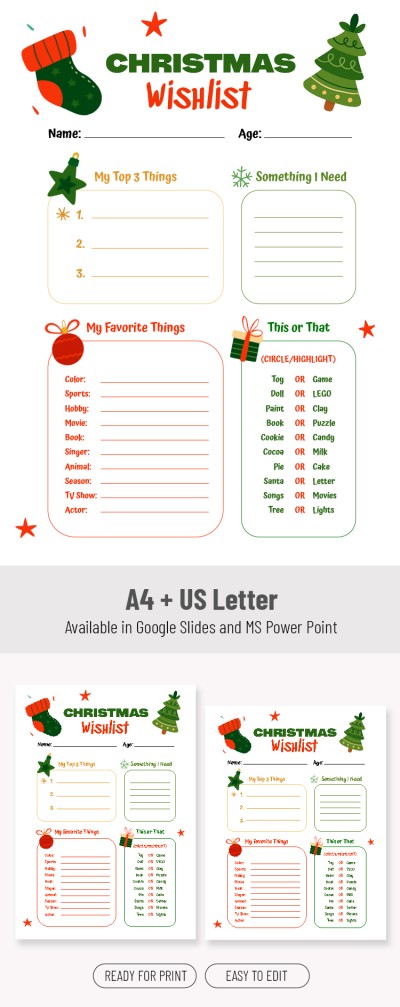
A letter to Santa is cool, but our Kids Christmas Wish List Template is even better. If you're wondering what to get your kids but still want it to be a surprise, this layout is perfect. You can choose the most-wanted gift from a list of several options, and it's also a great way to get to know your kids even better.
Plan Your Child's Perfect Christmas Morning
Our wish list template features a festive, Christmas-inspired design. The header is decorated with illustrations of a Christmas tree and a stocking, while each section includes ornaments, wrapped gifts, and stars. By the way, you can print it in A4 or US Letter size in color without any additional settings.
With this Christmas wish list template, your child can:
- Enter their name and age.
- List their top three gift ideas, things they really need, and favorite things (from colors to singers and books).
- Take a fun quiz by choosing "This or That" (toy or game, doll or Lego, etc.).
Of course, you can customize all the text, the quiz, and the design to suit your child's age and preferences. Our Christmas list template in Google Slides and PowerPoint is fully editable.
How to Use and Edit This Template

Get Your Document

Customize Everything

Add Your Content

Print, Export, or Share
Related Templates
Recently Viewed