
Log in
Sign up
ADVERTISEMENT
ADVERTISEMENT
Household Inventory List Template
Use this free template with Google Sheets and Microsoft Excel
4.33 (2 reviews)
•
Last updated
Updated
October 17, 2026
•
Created by
Natalia Prokhorenko
•
Type
List
ADVERTISEMENT
Save
Template Specification
Format
Google Sheets, Microsoft Excel
Created
November 20, 2024
Last Updated
October 17, 2026
Community
Added to collections by 96 Users
Usage Stats
235 downloads this month
Key Features of This Template
Structure
List Inventory Templates
Style
Minimalist
About this template
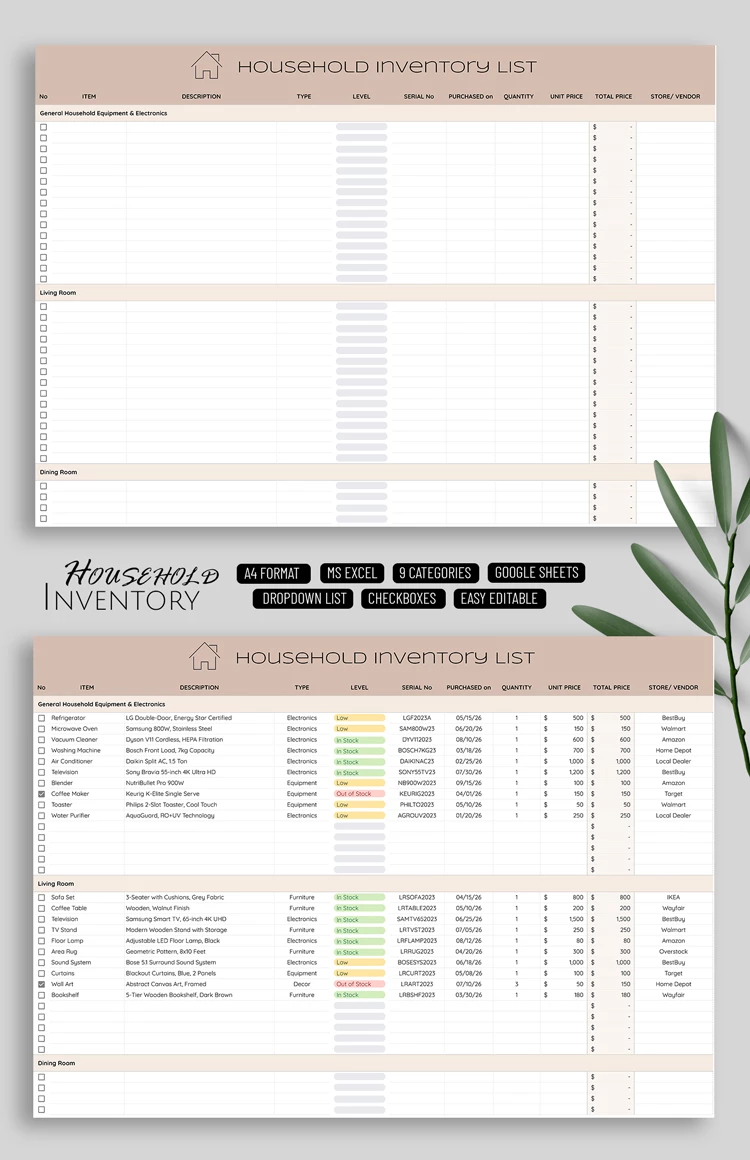
You can use our household inventory list for free right away. This spreadsheet offers a convenient layout to keep track of your household items. The home inventory template features nine distinct sections to include items located in different areas of your house or apartment and is suitable for insurance claims and for documenting your property before renting it out.
Using our spreadsheet, you can include item names, descriptions, types, serial numbers, purchase dates, quantities, total prices, and more. It offers automated formulas and customizable drop-down lists to make filling it out easier and faster.
Simply enter the data into the inventory list template in Google Sheets or Excel and save the document in any format you prefer.
ADVERTISEMENT
Free Template
Download Free Template
Choose your platform and start editing right away
PLATFORM
Google Sheets
Opens in browserMicrosoft Excel
.xlsx
PAPER SIZE
A4 Landscape
Google Sheets – A4 Landscape
No account required • Attribution required
Add to Collection
Facebook
Pinterest
Twitter
Copy link
WHAT’S INCLUDED
9 categorized sections for organization
Drop-down lists for easy entry
Checkboxes for quick tracking
Automatic total price calculation
Inventory Tips
1
Regularly update item quantities for accuracy.
2
Use categories to find items quickly.
3
Customize dropdowns to match your needs.
4
Back up your list monthly.
FAQ
Is this template compatible with Excel?
Yes, you can use it in Google Sheets or Excel.
Is the template easy to use?
Absolutely, it includes user-friendly layouts and dropdowns.
Can I customize the categories?
Yes, you can easily edit categories to fit your needs.
Is the template free?
Yes, it is completely free to download and use.
Does it help with insurance claims?
Yes, it’s ideal for documenting items for insurance purposes.
ADVERTISEMENT
How to Use and Edit This Template

1
Get Your Document
Click the "Edit Template" button to create your own editable copy in Google Sheets or download for Microsoft Excel

2
Customize Everything
Easily change colors, fonts, and layouts to match your unique style or brand identity

3
Add Your Content
Fill in your data, upload images, and replace the placeholder text with your own information

4
Print, Export, or Share
Print, export as PDF, or share instantly
Related Templates
Recently Viewed
Household Inventory List
Open in Google Sheets and Microsoft Excel
Household Inventory List
Open in Microsoft Excel
Your session has ended!
This may be due to prolonged inactivity or your account being used on another device.
OK
Link copied to clipboard