
Thegoodocs.com
Tracker Templates
Attendance Tracker Templates
Detailed Employee Attendance Tracker Template
Log in
Sign up
ADVERTISEMENT
ADVERTISEMENT
Detailed Employee Attendance Tracker Template
Use this template with Google Sheets and Microsoft Excel
4.42 (2 reviews)
•
Last updated
Updated
June 8, 2026
•
Created by
Chloe Hill
Template Specification
Format
Google Sheets
Created
November 29, 2021
Last Updated
June 8, 2026
Community
Added to collections by 9 Users
Usage Stats
0 downloads this month
About this template
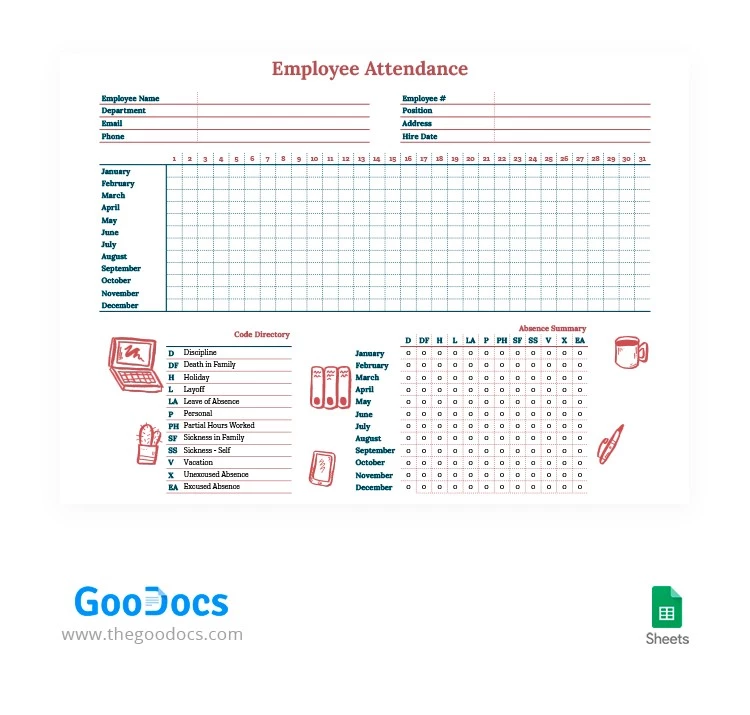
Most attendance sheet templates available on the internet allow you to gather pretty general information about how much time each of your employees spends at work.
If you want to include more details, you are welcome to use our employee attendance tracker Excel template. Make sure those who work really hard get decent rewards and motivate others to work harder using a detailed layout featuring such sections as:
- A header with an overall overview of employee names, departments, and contact details.
- A monthly calendar where you can indicate details about each employee's presence and work time.
- Code directory and monthly summary sections.
You can get access to this spreadsheet for free. Start customizing and filling it out in Google Sheets or Excel.
ADVERTISEMENT
Premium Template
50% OFF
Download Premium Template
Choose your platform and start editing right away
PLATFORM
Google Sheets
Opens in browser
PAPER SIZE
US Letter
Google Sheets – US Letter
Premium quality • No attribution required
Started at
$2.50
$4.99
/month
Instant download after signup
Access to 7,000+ templates
No attribution required
Cancel anytime
UNLOCK THIS TEMPLATE
💳 Safe Payments • 🔒 SSL Secured
Add to Collection
Facebook
Pinterest
Twitter
Copy link
WHAT’S INCLUDED
Detailed monthly attendance calendar
Absence summary and code directory
Comprehensive employee information section
Editable for individual customization
Tracker Tips
1
Enter data regularly to maintain accuracy.
2
Use color codes for quick reference.
3
Customize codes to fit company needs.
4
Review monthly summaries to identify patterns.
FAQ
Is this template compatible with Excel?
Yes, it works in Excel and Google Sheets.
Is the template easy to use?
Yes, it's user-friendly with an intuitive layout.
Can I customize the template?
Yes, all sections are fully editable.
Is this template free?
Yes, it is available for free download.
How does the code directory work?
It allows you to categorize types of absences easily.
ADVERTISEMENT
How to Use and Edit This Template

1
Get Your Document
Click the "Edit Template" button to create your own editable copy in Google Sheets or download for Microsoft Excel

2
Customize Everything
Easily change colors, fonts, and layouts to match your unique style or brand identity

3
Add Your Content
Fill in your data, upload images, and replace the placeholder text with your own information

4
Print, Export, or Share
Print, export as PDF, or share instantly
Related Templates
Recently Viewed
Detailed Employee Attendance Tracker
Open in Google Sheets and Microsoft Excel
Detailed Employee Attendance Tracker
Open in Microsoft Excel
Your session has ended!
This may be due to prolonged inactivity or your account being used on another device.
OK
Link copied to clipboard