Get unlimited access to 5000+ Templates for Google Docs, Slides and Sheets
Unlimited Access
ADVERTISEMENT

Conference Event Planning Budget

Use this template with Google Sheets and Microsoft Excel
4.25 (1 reviews)
Last updated Updated July 11, 2026
Created by Natalia Prokhorenko
ADVERTISEMENT

Template Specification

Format Google Sheets, Microsoft Excel
Created March 9, 2025
Last Updated July 11, 2026
Community Added to collections by 9 Users
Usage Stats 0 downloads this month

About this template

Before inviting people to any event, you have to calculate the financial component. You need to estimate accommodation, marketing, feedback, and other expenses prior to starting. Our Conference Event Planning Budget Template is the best tool to cope with the task without the additional services of financial analysts and accountants.

Sample Text, Examples of Calculations & Fillings

You don’t know where to start yet? Begin with our event budget example, which includes ready-made formulas and sample text for each category. You can review the text, options for promotion, and other categories. After that, you can adjust this template to any event needs!

Nine Sheets in a One Spreadsheet

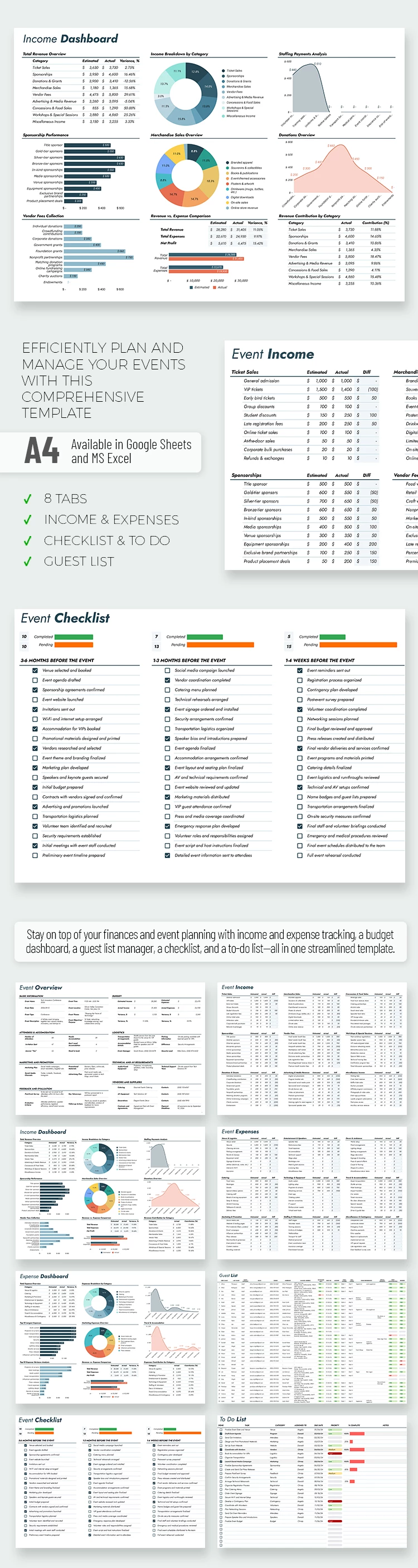
Our spreadsheet in Google Sheets and Excel formats is suitable for any event. It features nine sheets to help you organize information and prepare the perfect event for your audience.

The template consists of Event Overview, Income & Expenses (with dashboards), Guest List, Checklist, To-Do List, and Setup sheets. Each page includes organized tables for your entries. Start using this compressive tool with a premium subscription, or find an equally convenient free budget template in Google Sheets for your event.

Premium Template
50% OFF
Started at
$2.50 $4.99 /month
Instant download after signup
Access to 7,000+ templates
No attribution required
Cancel anytime
UNLOCK THIS TEMPLATE
💳 Safe Payments • 🔒 SSL Secured

WHAT’S INCLUDED

8 tabs: incomes, expenses, guest list
Automatic calculations and real-time tracking
Customizable event-specific categories
Visual charts: pie and bar graphs

Budget Tips

1
Review the dashboard weekly for real-time updates.
2
Customize categories to fit specific event needs.
3
Set reminders to update expenses daily.
4
Utilize checklist to ensure task completion.

FAQ

Is this template compatible with Excel? Yes, it works with both Google Sheets and Excel.
Is it user-friendly for beginners? Absolutely, the structure and formulas are easy to follow.
Can I customize the template? Yes, you can adjust categories and formulas as needed.
Is this template free? It requires a premium subscription for full access.
How does the guest list tab work? It allows you to manage and track guest details easily.
ADVERTISEMENT

How to Use and Edit This Template

Get Your Document

1

Get Your Document

Click the "Edit Template" button to create your own editable copy in Google Sheets or download for Microsoft Excel
Customize Everything
2

Customize Everything

Easily change colors, fonts, and layouts to match your unique style or brand identity
Add Your Content
3

Add Your Content

Fill in your data, upload images, and replace the placeholder text with your own information
Print, Export, or Share
4

Print, Export, or Share

Print, export as PDF, or share instantly

Related Templates

Recently Viewed