Sales Manager Resume Template
Use this free template with Google Docs and Microsoft Word
Template Specification
Key Features of This Template
About this template
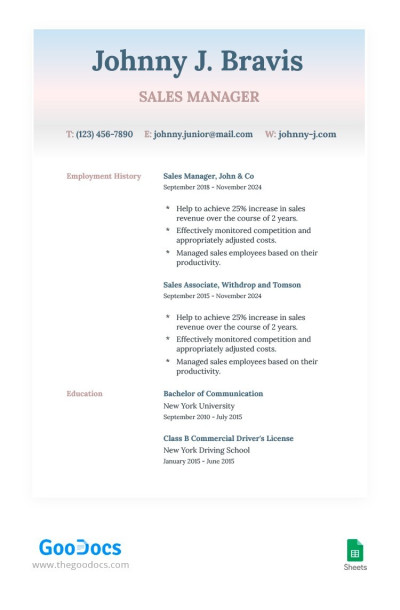
Our Sales Manager Resume Template is specially created to focus the attention of HR on your employment history and education. Use this example to provide comprehensive information about these essentials.
Attractive Design with Gradient Header
The resume template for a sales manager differs from the boring options. In addition to the white background, it features a gradient header section to bring the concentration for your document. This part can also be used to fill in your name, desired position, and contact details, including mail, phone number, and LinkedIn profile.
Simple Structure Without Frills
This form provides you with two sections for your information and a header. The first section is a work experience.
You can fill in up to two last jobs with their titles, working periods, achievements, and responsibilities (in the bulleted list). The education section provides you with ample space to enter your bachelor's degrees, the name of a higher educational institution, and periods of study.
Stop wasting time creating a document from scratch - use ready-made resume templates!
Download Free Template
Google Docs
Opens in browserWHAT’S INCLUDED
Resume Tips
FAQ
How to Use and Edit This Template

Get Your Document

Customize Everything

Add Your Content

Print, Export, or Share
Related Templates
Recently Viewed