Get unlimited access to 5000+ Templates for Google Docs, Slides and Sheets
Unlimited Access
All Templates
ADVERTISEMENT
ADVERTISEMENT

ATS Optimized Resume Template

Use this free template with Google Docs and Microsoft Word
3.58 (3 reviews)
•
Last updated Updated September 19, 2026
•
Created by Halyna Uygur
•
Type Simple, 1 Page, Chronological, ATS-Friendly, No
ADVERTISEMENT

Template Specification

Format Google Docs, Microsoft Word
Created August 5, 2024
Last Updated September 19, 2026
Community Added to collections by 30 Users
Usage Stats 27 downloads this month

Key Features of This Template

AI Assistant No Resume Templates

About this template

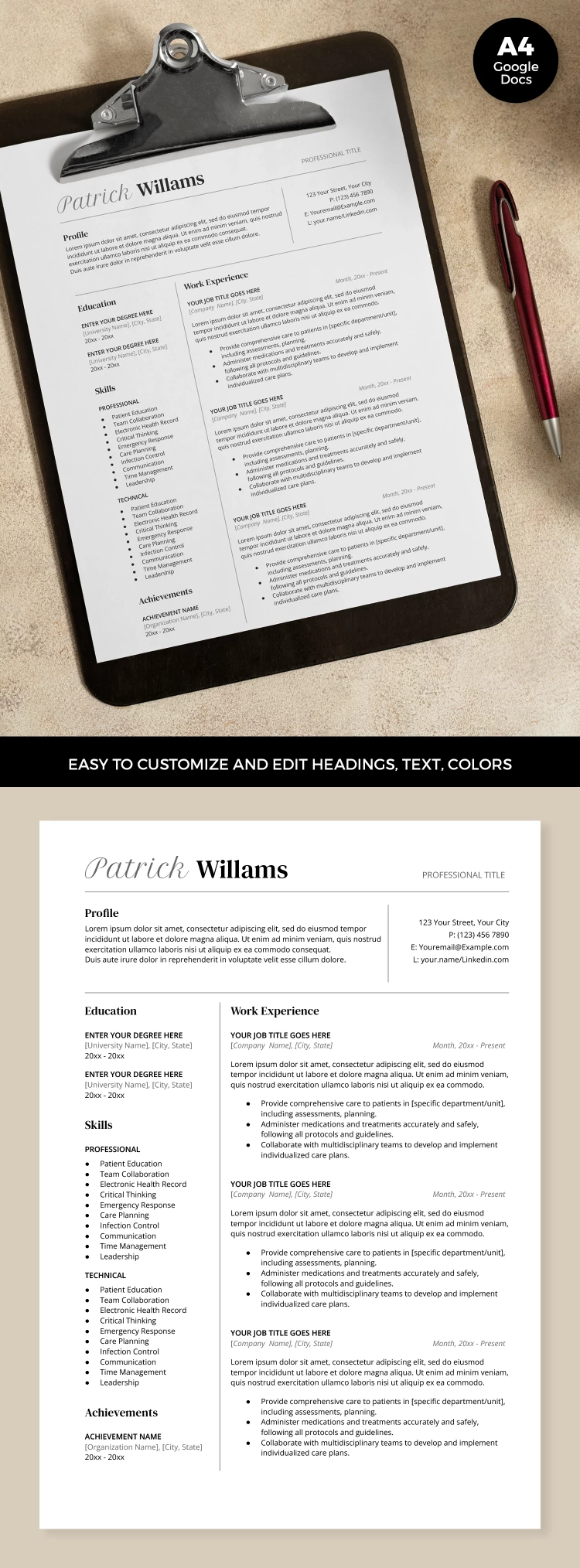
A correct structure, Word and Google Docs format, bulleted lists, and enough space for information make this ATS Resume Template indispensable in a modern job search. Be sure that applicant tracking systems will make your resume stand out from other candidates.

Fully Compatible with Modern ATS

Our ATS-friendly resume template meets all the requirements of these systems. So, using this free ATS resume template, you guarantee that your resume will end up on the HR desk.

Main features of the template:

  • Professionally organized sections.
  • Bulleted lists for most sections.
  • Ready-to-fill form.
  • Availability in ATS-friendly formats (Google Docs, Word, PDF).

In addition to the above, this resume form includes all the sections you may need. The template contains a profile, education, soft and hard skills, achievements, contacts, and enough space for work experience.

Find more modern solutions and resume templates on our website.

ADVERTISEMENT
Free Template

Download Free Template

Choose your platform and start editing right away
PLATFORM

Google Docs

Opens in browser

Microsoft Word

.docs
PAPER SIZE
A4
Google Docs – A4
No account required • Attribution required

WHAT’S INCLUDED

Customizable sections for easy updates
ATS-optimized formatting for job applications
Professional look with clean layout
Editable contact and profile sections

Resume Tips

1
Customize headings to match your profession.
2
Use bullet points for clarity and impact.
3
Keep descriptions concise and relevant.
4
Update contact information regularly.

FAQ

Is this template compatible with Google Docs? Yes, it works seamlessly in Google Docs and Word.
Can I customize the sections easily? Absolutely, adjust sections and text to suit your needs.
Is this template free to use? Yes, you can download and use it for free.
Can I change the text styles? Yes, the text styles are fully editable.
What page sizes are supported? The template supports A4 and US Letter sizes.
ADVERTISEMENT

How to Use and Edit This Template

Get Your Document

1

Get Your Document

Click the "Edit Template" button to create your own editable copy in Google Docs or download for Microsoft Word
Customize Everything
2

Customize Everything

Easily change colors, fonts, and layouts to match your unique style or brand identity
Add Your Content
3

Add Your Content

Fill in your data, upload images, and replace the placeholder text with your own information
Print, Export, or Share
4

Print, Export, or Share

Print, export as PDF, or share instantly

Related Templates

Recently Viewed