Get unlimited access to 5000+ Templates for Google Docs, Slides and Sheets
Unlimited Access
ADVERTISEMENT
ADVERTISEMENT

Simple 2020 May Calendar Template

Use this free template with Google Docs and Microsoft Word
4.42 (2 reviews)
Last updated Updated July 14, 2026
Created by Elijah Johnson
ADVERTISEMENT

Template Specification

Format Google Docs
Created May 26, 2021
Last Updated July 14, 2026
Community Added to collections by 0 Users
Usage Stats 0 downloads this month

About this template

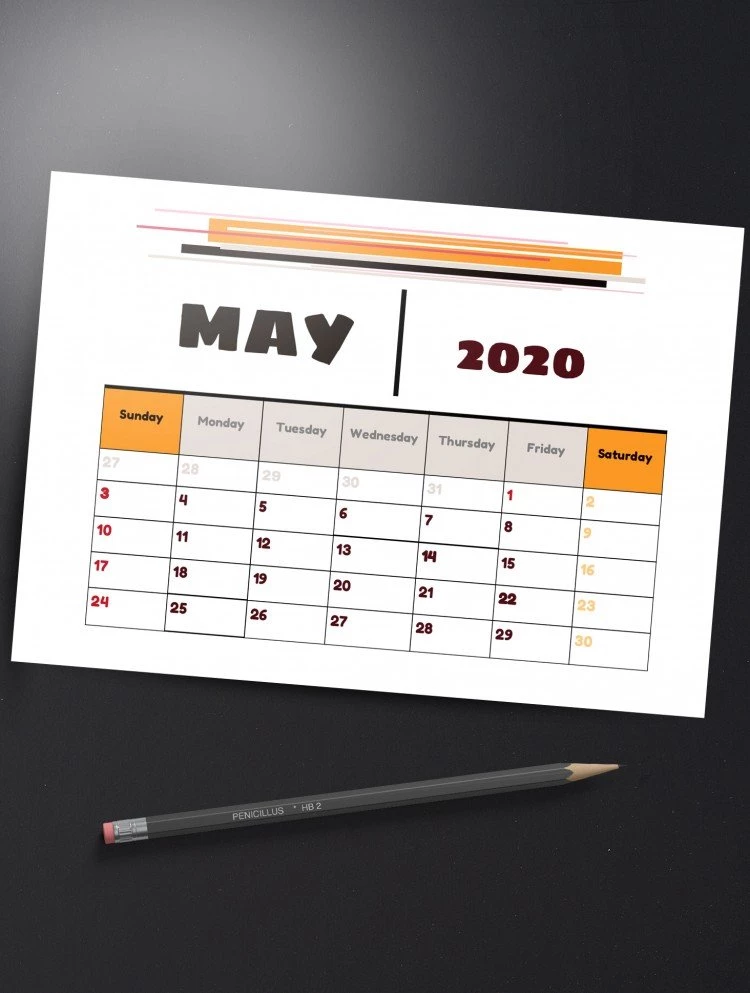
Looking for a simple and unobtrusive calendar 2020 template? Pay attention to this calendar template for google docs. Using our service, you can get free google templates of professional design. Moreover, we allow you to edit and adjust each template using google documents. No special preparation needed! Tired of looking at your phone screen to find out what day it is? Then you definitely need this calendar 2020 template. The template is made in universal design, so it is suitable for both the office and home atmosphere. All you need is to edit the template to your liking and download that. This calendar template is absolutely free for both commercial and personal use. Keep in mind that you can download the template and transfer that to a printing office. Therefore, you can get perfect calendar versions in any format. Complete your workplace with our designer calendar template. Also, not forget to check out our social media. There you can stay tuned with our new google templates collections. If you enjoy our free templates – share a link to thegoodocs.com. We work tirelessly to provide you original templates for google docs.

ADVERTISEMENT
Free Template

Download Free Template

Choose your platform and start editing right away
PLATFORM

Google Docs

Opens in browser
PAPER SIZE
A4
US Letter
Google Docs – A4
No account required • Attribution required

WHAT’S INCLUDED

Simple, sleek calendar design
Editable monthly layouts
Customizable text for events
Print-ready format for convenience

Calendar Tips

1
Use bold text for important dates.
2
Customize font styles to fit your theme.
3
Print on card stock for durability.
4
Add color codes for different events.

FAQ

Is this template free to use? Yes, it is free for personal and commercial use.
How can I customize the calendar layout? Edit directly in Google Docs or Microsoft Word.
Can I use this on both Google Docs and Microsoft Word? Yes, it's compatible with both platforms.
Is the template easy to use for beginners? Absolutely, it's designed for intuitive use and easy customization.
What page sizes does the template support? It supports A4 and US Letter sizes.
ADVERTISEMENT

How to Use and Edit This Template

Get Your Document

1

Get Your Document

Click the "Edit Template" button to create your own editable copy in Google Docs or download for Microsoft Word
Customize Everything
2

Customize Everything

Easily change colors, fonts, and layouts to match your unique style or brand identity
Add Your Content
3

Add Your Content

Fill in your data, upload images, and replace the placeholder text with your own information
Print, Export, or Share
4

Print, Export, or Share

Print, export as PDF, or share instantly

Related Templates

Recently Viewed