Get unlimited access to 5000+ Templates for Google Docs, Slides and Sheets
Unlimited Access
ADVERTISEMENT
ADVERTISEMENT

Company Monthly Budget Template

Use this free template with Google Sheets and Microsoft Excel
4.25 (1 reviews)
Last updated Updated July 11, 2026
Created by Natalia Prokhorenko
Type Monthly
ADVERTISEMENT

Template Specification

Format Google Sheets
Created June 12, 2024
Last Updated July 11, 2026
Community Added to collections by 15 Users
Usage Stats 17 downloads this month

Key Features of This Template

Budget Period Monthly Budget Templates

About this template

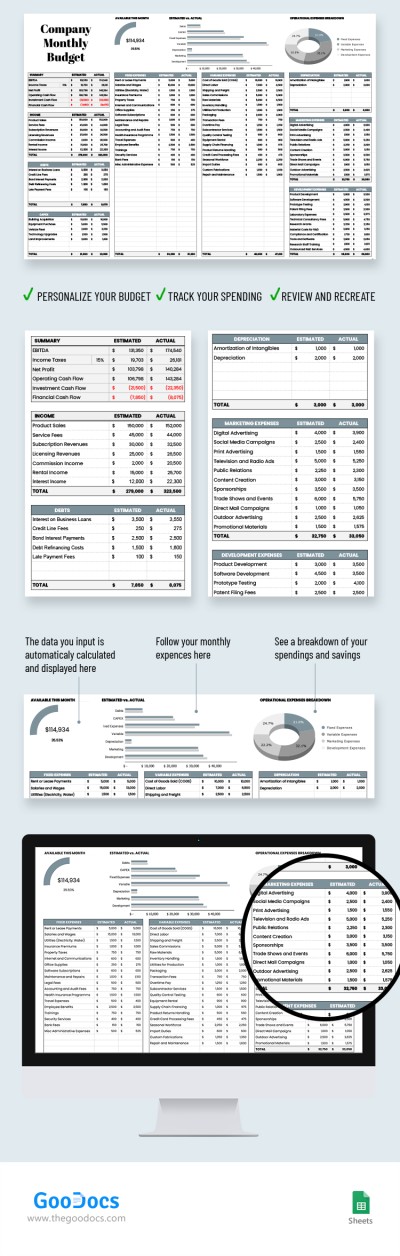
The only tool your business needs for budgeting is our Company Monthly Budget template with charts. You can utilize this all-in-one solution to calculate fixed, marketing, development, and other expenses and income.

Comprehensive Budget Spreadsheet

Get a copy of our company budget template and make your accounting easier. Google Sheets and a fully automated template with formulas will help you complete the task faster and more efficiently.

Additionally, we have added a pie chart for "available this month budget" and "operational expenses breakdown". Estimated vs actual expenses are shown via a bar chart to visualize all categories in the table.

Ready-Made Categories - No Need to Create Anything

All income and expenses you fill into the monthly budget template are divided into categories. Among them are fixed expenses, debts, capex, variable expenses, depreciation, marketing and development expenses, etc. You can include an estimate and current amount, and the total for each section.

If you need professional solutions for business or personal needs, then discover even more of our budget templates.

ADVERTISEMENT
Free Template

Download Free Template

Choose your platform and start editing right away
PLATFORM

Google Sheets

Opens in browser
PAPER SIZE
A4
Google Sheets – A4
No account required • Attribution required

WHAT’S INCLUDED

Comprehensive expense tracking sections
Automatic calculations and formulas
Charts: bar chart and pie chart
Customizable income and expense categories

Budget Tips

1
Regularly update both estimated and actual figures.
2
Use charts to quickly identify spending issues.
3
Review your budget performance monthly.
4
Adjust categories to fit business needs.

FAQ

Is this template compatible with Excel? Yes, it works with both Google Sheets and Excel.
Is the template easy to use? Absolutely, it includes intuitive charts and automatic calculations.
Can I customize categories? Yes, you can rename and adjust all categories to fit your needs.
Is this template free to download? Yes, it’s available for free download.
Can the template track both income and expenses? Yes, it covers both income and various expense types.
ADVERTISEMENT

How to Use and Edit This Template

Get Your Document

1

Get Your Document

Click the "Edit Template" button to create your own editable copy in Google Sheets or download for Microsoft Excel
Customize Everything
2

Customize Everything

Easily change colors, fonts, and layouts to match your unique style or brand identity
Add Your Content
3

Add Your Content

Fill in your data, upload images, and replace the placeholder text with your own information
Print, Export, or Share
4

Print, Export, or Share

Print, export as PDF, or share instantly

Related Templates

Recently Viewed