Get unlimited access to 5000+ Templates for Google Docs, Slides and Sheets
Unlimited Access

Workout Log Book Template

Use this free template with Google Slides and Microsoft PowerPoint
4.25 (1 reviews)
Last updated Updated June 30, 2026
Created by Vladimir Belyakin
Type Nonfiction, Aesthetic, Portrait, A4 / US Letter
ADVERTISEMENT

Template Specification

Format Google Slides
Created June 1, 2024
Last Updated June 30, 2026
Community Added to collections by 6 Users
Usage Stats 3 downloads this month

Key Features of This Template

About this template

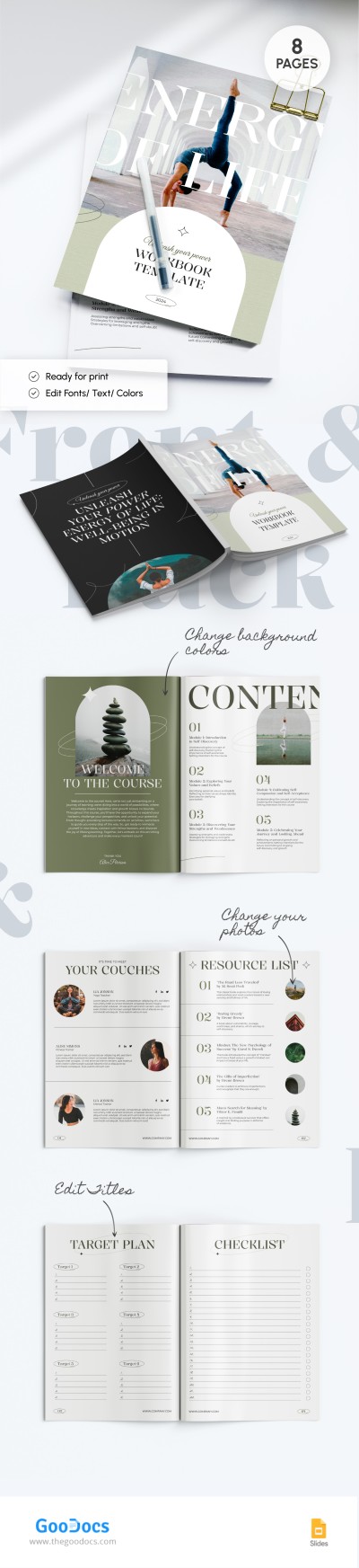
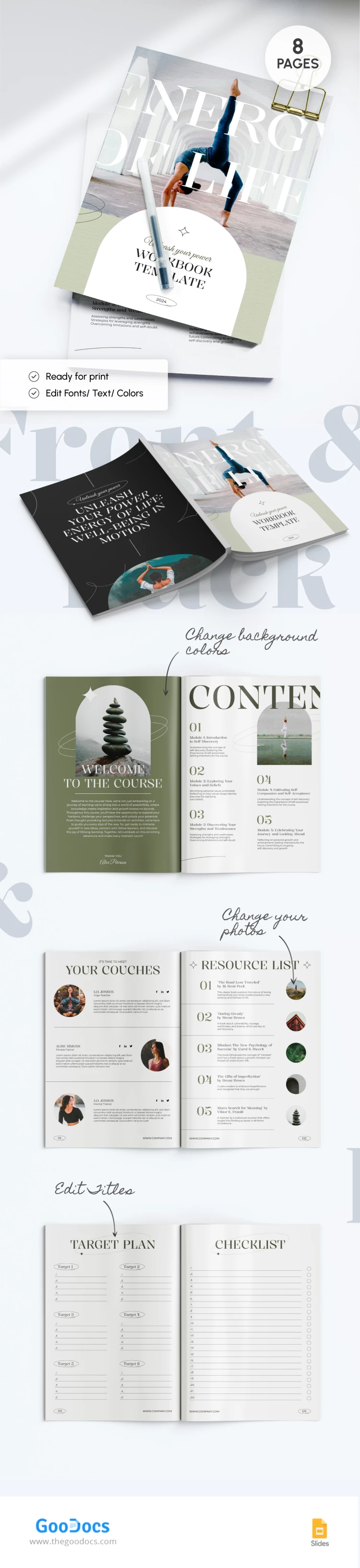
This Courses Workbook template features a stylish and inspiring design that will help your students be patient and consistent. Make sure you provide them with detailed instructions and the best practices.

Elegant Yoga Design

The cover page features a girl standing in a yoga pose. There is also a stylish font to name your book and a placeholder to include information about the project, publication year, and other details.

Overall template's design is made in green and white colors. The last page features a black background and white lettering to motivate your students more.

Eight Ready-to-Use Pages

This book Google Slide template provides you with eight sheets, each made to include essential details about your course:

  • Cover page and "welcome to the course" sheet.
  • Content page with placeholders to name five modules.
  • "Your couches" sheet.
  • Resource list with up to five positions.
  • Target plan with ample space to include six positions and five steps to achieve them, and more.

Use only the best book templates in Google Docs and Google Slides!

ADVERTISEMENT
Free Template

Download Free Template

Choose your platform and start editing right away
PLATFORM

Google Slides

Opens in browser
PAPER SIZE
A4
Google Slides – A4
No account required • Attribution required

WHAT’S INCLUDED

Editable cover and content pages
Customizable yoga-themed design
Resource list for course materials
Target plan and checklist sections

Book Tips

1
Edit colors to match your brand's identity.
2
Personalize placeholders with your course details.
3
Utilize the checklist to track progress.
4
Adjust the font style for better readability.

FAQ

Is the template compatible with PowerPoint? Yes, it's available for PowerPoint and Google Slides.
Is it user-friendly for beginners? Yes, it's designed to be easy to use and customize.
Can I modify the text and images? Yes, all elements are fully editable to suit your needs.
Is this template free of charge? Yes, you can download and use it for free.
Does it include a resource list page? Yes, there's a dedicated page for listing resources.
ADVERTISEMENT

How to Use and Edit This Template

Get Your Document

1

Get Your Document

Click the "Edit Template" button to create your own editable copy in Google Slides or download for Microsoft PowerPoint
Customize Everything
2

Customize Everything

Easily change colors, fonts, and layouts to match your unique style or brand identity
Add Your Content
3

Add Your Content

Fill in your data, upload images, and replace the placeholder text with your own information
Print, Export, or Share
4

Print, Export, or Share

Print, export as PDF, or share instantly

Related Templates

Recently Viewed