
Thegoodocs.com
Programme Vorlagen
Trauerprogramme Vorlagen
Gedenkgottesdienst Beispielfuneralprogramm Template
Anmelden
Registrieren
ADVERTISEMENT
ADVERTISEMENT
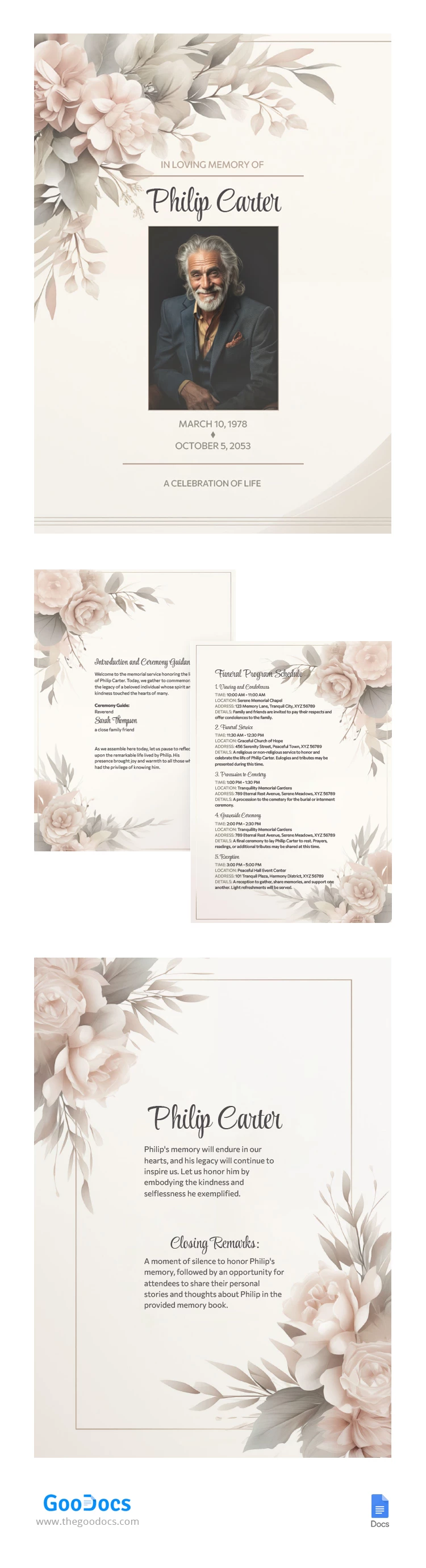
Gedenkgottesdienst Beispielfuneralprogramm Vorlage
Verwende dies kostenlos Vorlage mit Google Docs and Microsoft Word
4.25 (1 Bewertungen)
•
Zuletzt aktualisiert
Updated
October 3, 2026
•
Ecrstellt von
Anastasiia Lytvynova
ADVERTISEMENT
Speichern
Vorlagenspezifikationen
Format
Google Docs
Erstellt
December 19, 2023
Zuletzt aktualisiert
October 3, 2026
Community
Zu Sammlungen hinzugefügt von 25 Nutzer
Nutzungsstatistiken
18 Downloads in diesem Monat
Hauptmerkmale dieser Vorlage
Geeignet für.
Funeral , Funeral Home
ADVERTISEMENT
Kostenlose Vorlage
Kostenlose Vorlage herunterladen
Wählen Sie Ihre Plattform und beginnen Sie sofort mit der Bearbeitung
PLATTFORM
Google Docs
Öffnet im Browser
PAPIERFORMAT
A4
US Letter
Google Docs – A4
Kein Konto erforderlich • Namensnennung erforderlich
Zur Sammlung hinzufügen
Facebook
Pinterest
Twitter
Link kopieren
WAS ENTHALTEN IST
Vollständig formatiertes mehrseitiges Layout
Bearbeitbare Überschriften und Textstile
Druckfertig für A4 und US-Briefgrößen
Florale Motive für ein elegantes Design
Programme Tipps
1
Personalisiere den Text vor dem Drucken für eine persönliche Note.
2
Wähle hochwertiges Papier für beste Ergebnisse.
3
Ersetze Platzhalterbilder durch persönliche Fotos.
4
Überprüfe alle Details auf Richtigkeit vor dem Drucken.
FAQ
Ist diese Vorlage kostenlos?
Ja, sie ist kostenlos herunterzuladen und zu verwenden.
Kann ich den Text bearbeiten?
Ja, der gesamte Text kann in Google Docs und Microsoft Word bearbeitet werden.
Welche Seitengrößen werden unterstützt?
Die Vorlage ist mit A4- und US-Briefgrößen kompatibel.
Ist es einfach zu bedienen?
Ja, einfach herunterladen und sofort mit der Bearbeitung beginnen.
Welche Software benötige ich?
Es erfordert Google Docs oder Microsoft Word zum Bearbeiten.
ADVERTISEMENT
So verwenden und bearbeiten Sie diese Vorlage

1
Erhalten Sie Ihr Dokument
Klicken Sie auf „Vorlage bearbeiten“, um eine bearbeitbare Kopie in Google Docs zu erstellen oder für Microsoft Word herunterzuladen

2
Alles anpassen
Ändern Sie ganz einfach Farben, Schriftarten und Layouts entsprechend Ihrem Stil oder Ihrer Marke

3
Fügen Sie Ihre Inhalte hinzu
Füllen Sie Ihre Daten aus, laden Sie Bilder hoch und ersetzen Sie den Platzhaltertext

4
Drucken, exportieren oder teilen
Drucken, als PDF exportieren oder sofort teilen
Ähnliche Vorlagen
Kürzlich angesehen
Gedenkgottesdienst Beispielfuneralprogramm
Öffnen in Google Docs and Microsoft Word
Gedenkgottesdienst Beispielfuneralprogramm
Öffnen in Microsoft Word
Ihre Sitzung ist beendet!
Dies kann auf eine längere Inaktivität oder die Verwendung Ihres Kontos auf einem anderen Gerät zurückzuführen sein.
OK
Link in die Zwischenablage kopiert