Get unlimited access to 5000+ Templates for Google Docs, Slides and Sheets
Unlimited Access
ADVERTISEMENT
ADVERTISEMENT

45 Day Calendar Template

Use this free template with Google Docs and Microsoft Word
4.25 (1 reviews)
Last updated Updated July 25, 2026
Created by Vladimir Belyakin
Type Blank, Simple
ADVERTISEMENT

Template Specification

Format Google Docs, Microsoft Word
Created July 31, 2024
Last Updated July 25, 2026
Community Added to collections by 3 Users
Usage Stats 2 downloads this month

Key Features of This Template

About this template

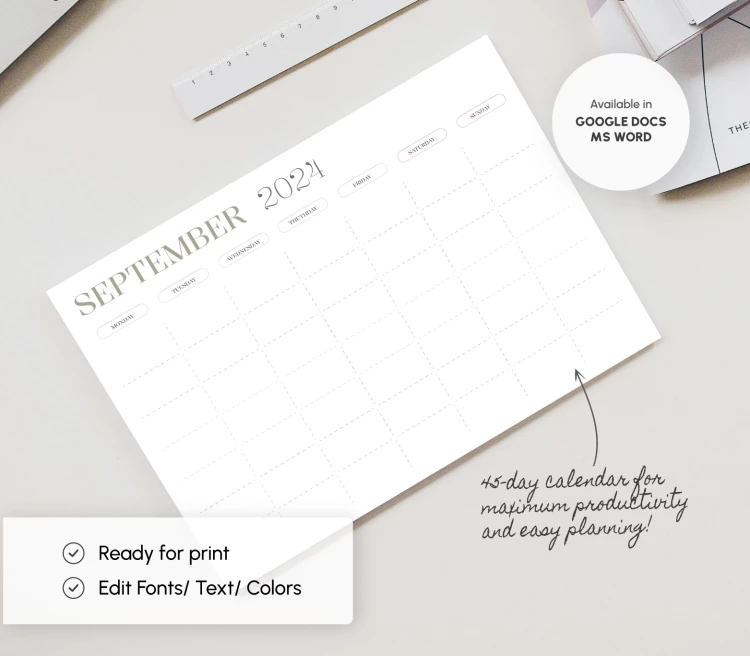
This editable 45-day Calendar Template is suitable for any year, month, or task. Organize your activities for 45+ days in advance using a simple and practical layout.

Horizontal Layout and Straightforward Structure

This free printable blank calendar template is divided into two parts: a header and a table for your plans. The header section includes an editable placeholder where you can fill in the month and year.

This calendar template for Google Docs and Word does not include pre-set dates, so you can fill them in yourself. This makes the template up to date year after year. You can also grab a PowerPoint and Google Slides calendar on our website..

Large Table for Your Notes

Use the template online, offline, or after printing. It offers plenty of space to write down tasks for each day. The days of the week are clearly marked at the top, so you can quickly find the field you need. Our template is ready to print in A4 format, and all the settings are already included.

Check out more calendar templates and choose the best options for free or with a premium subscription.

ADVERTISEMENT
Free Template

Download Free Template

Choose your platform and start editing right away
PLATFORM

Google Docs

Opens in browser

Microsoft Word

.docs
PAPER SIZE
A4
Google Docs – A4
No account required • Attribution required

WHAT’S INCLUDED

Customizable 45-day calendar grid
Editable month and year headings
Print-ready with ample note space
Compatible with Google Docs and Word

Calendar Tips

1
Highlight special days with bold text for emphasis.
2
Set reminders for important tasks in advance.
3
Regularly update and check your calendar for changes.
4
Use color coding for different event types.

FAQ

Is this template free? Yes, it's free to download and use.
Can I use it in Word? Yes, it's compatible with Google Docs and Microsoft Word.
Is the template easy to edit? Yes, the layout is fully editable in both apps.
How do I customize the headings? Click the text to edit month and year directly.
What page sizes are supported? The template is ready for A4 and US Letter sizes.
ADVERTISEMENT

How to Use and Edit This Template

Get Your Document

1

Get Your Document

Click the "Edit Template" button to create your own editable copy in Google Docs or download for Microsoft Word
Customize Everything
2

Customize Everything

Easily change colors, fonts, and layouts to match your unique style or brand identity
Add Your Content
3

Add Your Content

Fill in your data, upload images, and replace the placeholder text with your own information
Print, Export, or Share
4

Print, Export, or Share

Print, export as PDF, or share instantly

Related Templates

Recently Viewed