Get unlimited access to 5000+ Templates for Google Docs, Slides and Sheets
Unlimited Access
ADVERTISEMENT
ADVERTISEMENT

Restaurant Manager Log Book Template

Use this free template with Google Docs and Microsoft Word
4.25 (1 reviews)
Last updated Updated July 11, 2026
Created by Halyna Uygur
Type Nonfiction, Simple, Portrait, A4 / US Letter
ADVERTISEMENT

Template Specification

Format Google Docs, Microsoft Word
Created July 31, 2024
Last Updated July 11, 2026
Community Added to collections by 7 Users
Usage Stats 3 downloads this month

Key Features of This Template

About this template

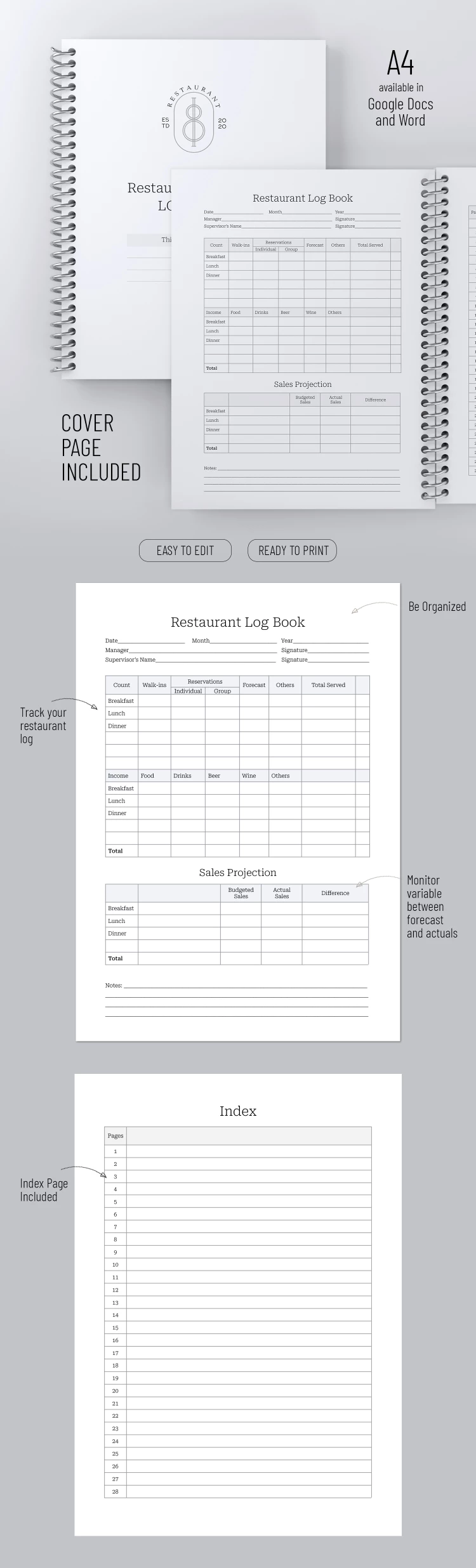
Our Restaurant Manager Log Book Template features three blank pages to accommodate your sales, reservations, and other points. Make sure you are using a convenient everyday restaurant manager log book!

All-in-One Black and White Blank

This template is indispensable for obtaining statistics on visits, customer purchases, and busiest hours. This info will help develop marketing campaigns and promotions and attract more people to the establishment!

The Multifunctional Restaurant Log Book

This form consists of a cover page with placeholders for the manager's and restaurant's name and logo. The main log pages include headers and tables for tracking walk-ins, individual and group reservations, forecasts, and total meals and drinks for breakfast, lunch, and dinner.

We also included Sales Projections, Income, and Total Sections and Notes. The last index page can be used at your discretion. Find even more book templates on our website!

ADVERTISEMENT
Free Template

Download Free Template

Choose your platform and start editing right away
PLATFORM

Google Docs

Opens in browser

Microsoft Word

.docs
PAPER SIZE
A4
Google Docs – A4
No account required • Attribution required

WHAT’S INCLUDED

Comprehensive sections for meals and sales
Customizable manager and restaurant details
Separate tables for reservations and walk-ins
Notes and index pages for additional organization

Book Tips

1
Fill out the log book at the end of each shift.
2
Compare sales projections weekly to adjust strategies.
3
Use the index page for quick navigation.
4
Regularly update group reservations for accuracy.

FAQ

Is this template compatible with Excel? Yes, you can download and use it in Excel.
Is this template free? Yes, you can download it for free.
How easy is it to customize? Very easy; simply edit the fields as needed.
Can I track sales and reservations? Yes, it includes sections for tracking both.
Do I need a Google account? No, it's also available for Microsoft Word.
ADVERTISEMENT

How to Use and Edit This Template

Get Your Document

1

Get Your Document

Click the "Edit Template" button to create your own editable copy in Google Docs or download for Microsoft Word
Customize Everything
2

Customize Everything

Easily change colors, fonts, and layouts to match your unique style or brand identity
Add Your Content
3

Add Your Content

Fill in your data, upload images, and replace the placeholder text with your own information
Print, Export, or Share
4

Print, Export, or Share

Print, export as PDF, or share instantly

Related Templates

Recently Viewed