ADVERTISEMENT
ADVERTISEMENT
College Budget with Charts Template
Use this free template with Google Sheets and Microsoft Excel
3.62 (3 reviews)
•
Last updated
Updated
October 31, 2026
•
Created by
Oliver Brown
ADVERTISEMENT
Template Specification
Format
Google Sheets
Created
January 22, 2022
Last Updated
October 31, 2026
Community
Added to collections by 5 Users
Usage Stats
8 downloads this month
Key Features of This Template
Suitable For
Students
About this template
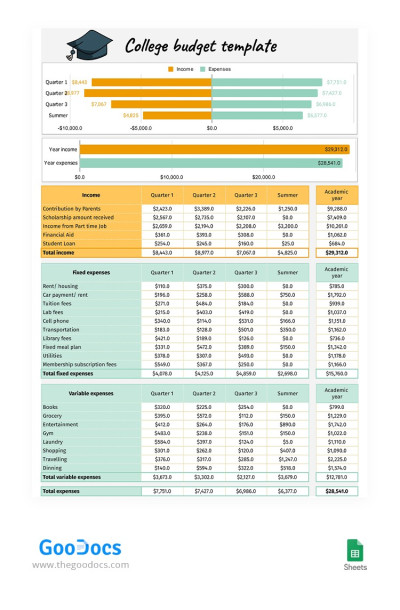
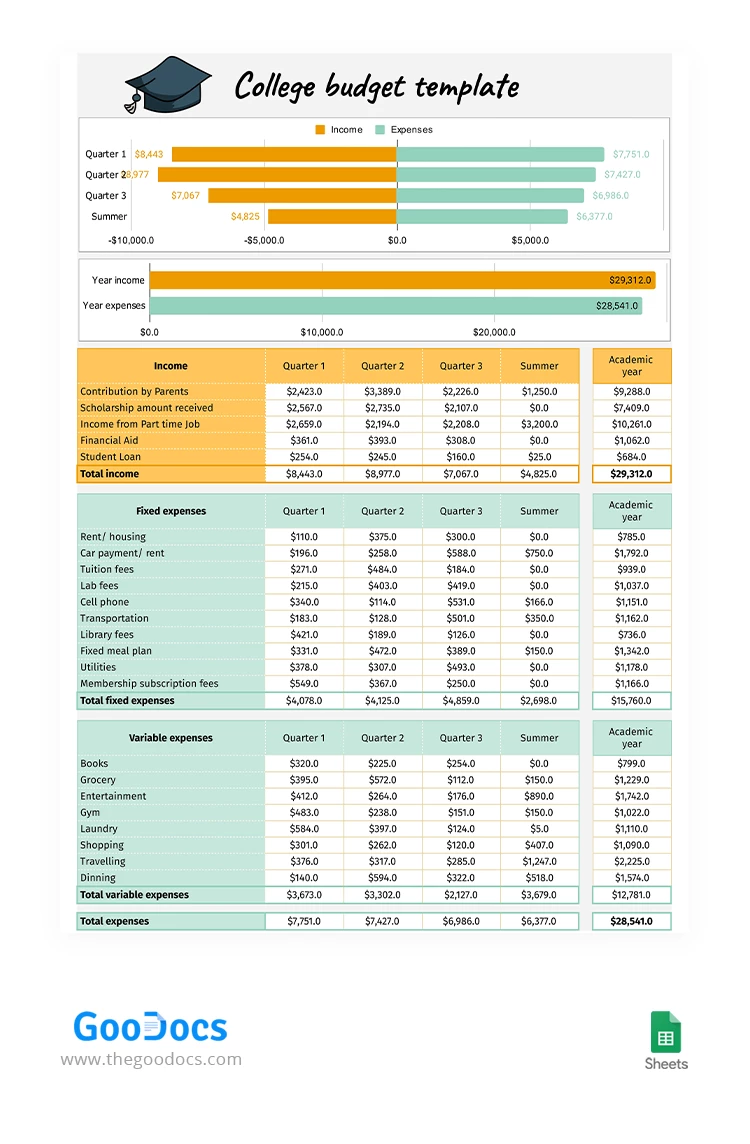
Our College Budget Template with Charts not only makes financial management easy but also allows you to visualize your spending habits. Built-in charts work automatically based on the amounts you enter in the sections below.
The template allows you to track:
- Income: Includes six categories, from parents' contributions to financial aid.
- Fixed expenses: Pre-set categories such as rent or housing, lab fees, cell phone, transportation, utilities, and more.
- Variable expenses: Covers books, groceries, shopping, and other spending.
Columns divide the year into three quarters and the summer. Total income and expenses are automatically calculated for each quarter, as well as by category for the entire academic year.
The standout feature is the charts, which are automatically generated as you fill out the template. These include column charts comparing expenses and income for each quarter and for the entire year.
Find a convenient college student budget template in Excel on our website.
ADVERTISEMENT
Free Template
Download Free Template
Choose your platform and start editing right away
PLATFORM
PAPER SIZE
US Letter
No account required • Attribution required
WHAT’S INCLUDED
Detailed income and expenses sections
Automatically generated comparison charts
Customizable for each academic quarter
Built-in formulas for budget tracking
Budget Tips
Update your budget sheet weekly for accuracy.
Keep track of all income sources for clarity.
Review expenses quarterly to adjust spending.
Use charts to visualize financial habits.
FAQ
Is this template compatible with Excel?
Yes, it's designed for Google Sheets and Excel.
How easy is it to use?
Very intuitive with pre-set categories and charts.
Can I customize the categories?
Yes, you can add or modify categories as needed.
Is the template free to use?
Yes, it's free to download and use.
Does it cover multiple semesters?
Yes, it includes three quarters and the summer term.
ADVERTISEMENT
How to Use and Edit This Template

Get Your Document
Click the "Edit Template" button to create your own editable copy in Google Sheets or download for Microsoft Excel

Customize Everything
Easily change colors, fonts, and layouts to match your unique style or brand identity

Add Your Content
Fill in your data, upload images, and replace the placeholder text with your own information

Print, Export, or Share
Print, export as PDF, or share instantly