
Get unlimited access to 5000+ Templates for Google Docs, Slides and Sheets
Unlimited Access
ADVERTISEMENT
ADVERTISEMENT

50/30/20 Biweekly Budget Template

Use this free template with Google Sheets and Microsoft Excel
4.25 (1 reviews)
Last updated Updated July 9, 2026
Created by Natalia Prokhorenko
Type 50/30/20, Simple
ADVERTISEMENT

Template Specification

Format Google Sheets, Microsoft Excel
Created August 2, 2025
Last Updated July 9, 2026
Community Added to collections by 5 Users
Usage Stats 36 downloads this month

Key Features of This Template

About this template

Our 50/30/20 Biweekly Budget Template will be an indispensable tool for everyone who receives a biweekly salary and wants to manage it effectively. This budgeting method is considered one of the most practical, as you can allocate 50% of your income to essentials, 30% to wants, and 20% to savings or an emergency fund.

Plan Every Paycheck with the 50/30/20 Rule

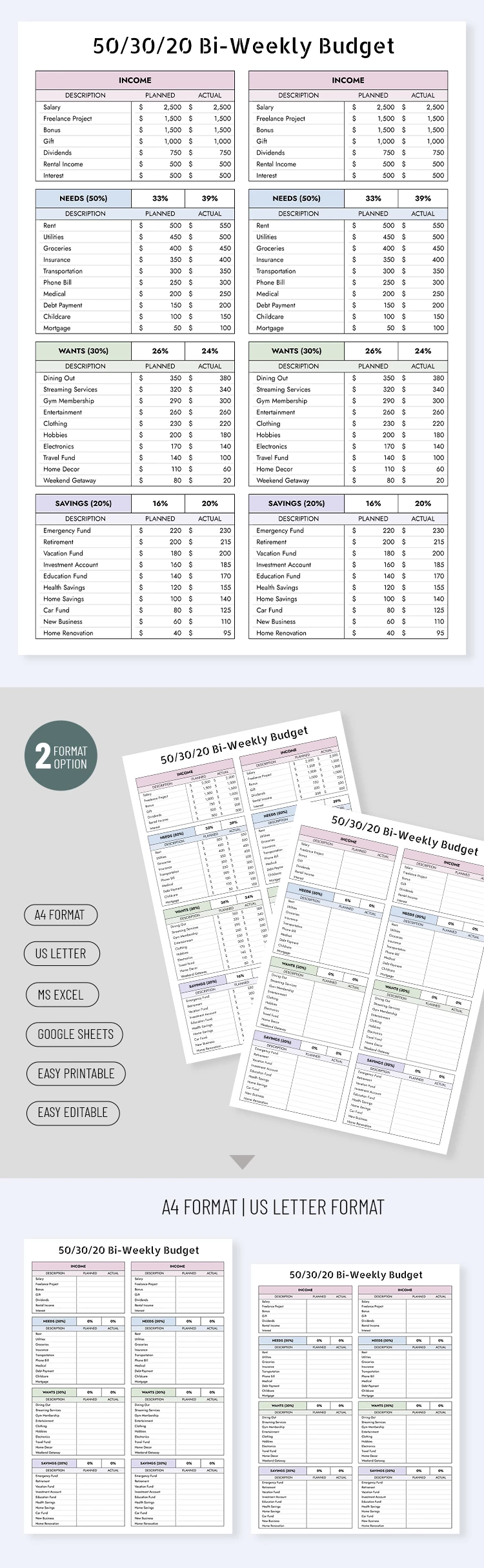
Our 50/30/20 budget template in Excel and Google Sheets formats offers everything you need to plan your finances digitally. You can also print the budget sheet in A4 or US Letter size for handwritten use.

The template contains two separate tables:

  • In the Income section, you can list all types of income, from salary and freelance projects to dividends and gifts.
  • In the Needs section, you can distribute half of your income to rent, utilities, groceries, insurance, and other mandatory expenses.
  • In the Wants section, you assign 30% of your income to dining out, entertainment, clothing, a travel fund, and other enjoyable expenses.
  • Your Savings section should get 20% of your income and include an emergency fund, retirement savings, investment accounts, health savings, and more.

You can manually customize the categories for each table. Click on a cell, enter a new name, and fill in the planned and actual amounts. Start using this budget template for free today.

ADVERTISEMENT
Free Template

Download Free Template

Choose your platform and start editing right away
PLATFORM

Google Sheets

Opens in browser

Microsoft Excel

.xlsx
PAPER SIZE
A4
US Letter
Google Sheets – A4
No account required • Attribution required

WHAT’S INCLUDED

Bi-Weekly income and expense tracking
Customizable sections for easy organization
Printable in A4 or US Letter
Supports Google Sheets and Excel formats

Budget Tips

1
Review and update your budget every two weeks.
2
Customize categories to match your financial goals.
3
Set reminders to input data regularly.
4
Use charts to visualize spending patterns.

FAQ

Is this template compatible with both Google Sheets and Excel? Yes, you can use it in both Google Sheets and Excel.
How easy is it to customize this template? Very easy, simply click on a cell to edit.
Is the template free to download? Yes, this budget template is free to use.
Can I print the budget for offline use? Yes, you can print in A4 or US Letter sizes.
What budgeting rule does it follow? It follows the 50/30/20 budgeting rule for expenses and savings.
ADVERTISEMENT

How to Use and Edit This Template

Get Your Document

1

Get Your Document

Click the "Edit Template" button to create your own editable copy in Google Sheets or download for Microsoft Excel
Customize Everything
2

Customize Everything

Easily change colors, fonts, and layouts to match your unique style or brand identity
Add Your Content
3

Add Your Content

Fill in your data, upload images, and replace the placeholder text with your own information
Print, Export, or Share
4

Print, Export, or Share

Print, export as PDF, or share instantly

Related Templates

Recently Viewed


